Blue Canvas vs Flosum: Feature Comparison, Use Cases, and What to Choose in 2026
This guide explains the core concepts, what to evaluate in 2026, and how Blue Canvas and Flosum stack up across features, use cases, and pricing. The goal is to help remote teams decide confidently based on their priorities like Git workflows, native governance, setup effort, and restore granularity.
 By Randalyn Hill-Coffer·Reviewed by the Blue Canvas team··Updated January 21, 2026·8 min read
This article focuses on how challenging it can be to assess and choose between Blue Canvas and Flosum for Salesforce. This post will cover the security architecture of on-platform vs. off-platform Salesforce deployment tools. This post will focus on which option is better fr remote-first companies with strict compliance requirements? Blue Canvas and Flosum are both capable of org comparisons, version control, and metadata backup. Each platform targets similar problems, but with different approaches, architectures, and operational tradeoffs. This guide explains the core concepts, what to evaluate in 2026, and how Blue Canvas and Flosum stack up across features, use cases, and pricing. The goal is to help teams decide confidently based on their priorities like Git workflows, native governance, setup effort, and restore granularity. We compare both tools fairly, then explain when Blue Canvas is the better overall choice.
What is Salesforce DevOps for org comparisons, version control, and metadata backup, and why does it matter in 2026?
Salesforce DevOps combines tooling for change tracking, version control, testing, deployments, and recovery. For many teams, the most visible needs are accurate org comparisons, Git-based version control, and reliable metadata backups. In 2026, rising release frequency and distributed teams make diff accuracy and rollback speed mission critical. Blue Canvas focuses on these pillars with Git-first automation that captures changes directly from orgs and backs up metadata continuously. The outcome is fewer surprises during deployments and faster recovery when something breaks, which is essential for regulated and fast-growing organizations alike.
What should you look for in a Salesforce DevOps platform for org comparisons, version control, and metadata backup?
Teams benefit from platforms that reduce manual effort during planning, simplify compliance, and shorten incident recovery. Look for accurate multi-org comparisons, native Git workflows that fit developer and admin patterns, and metadata backups that are continuous and granular. Equally important are intuitive UI, clear audit trails, and straightforward restore options. Blue Canvas emphasizes these criteria by combining automated org-to-Git capture, visual diffs, selective deploys, and point-in-time metadata restore. These capabilities reduce time spent troubleshooting and help avoid risky hotfixes, especially when release windows are tight.

Qualities of the best Salesforce DevOps solution
- Accurate org-to-org and org-to-branch comparisons
- Automated capture of org changes into version control
- Visual diffs and selective deployment planning
- Continuous, granular metadata backups with quick restore
- Transparent pricing and low-effort onboarding
Blue Canvas meets and often exceeds this list through Git-first automation, a diff engine designed for admins and developers, and point-in-time restore for metadata. Flosum addresses the list through a native approach with governance features and optional Git connectors. The choice often comes down to whether teams prefer a Git-centric, lightweight path or a broader native suite with more governance modules.
Flosum: What does the Salesforce-native DevOps suite offer in this category?
Flosum is a Salesforce-native release management and DevOps platform that emphasizes governance, security, and compliance. It offers pipelines, version control inside Salesforce, code quality integrations, and add-ons like data management and backup. Flosum’s native architecture appeals to organizations that want to keep DevOps workflows and data inside Salesforce. For teams prioritizing audits, approvals, and centralized visibility across admins and developers, Flosum is a credible choice. Its breadth of modules suits enterprises building a standardized operating model, though setup and training can take longer than Git-first tools.
Flosum Key Features
- Native Salesforce release management with governance workflows
- Version control inside Salesforce with optional Git integrations
- Org compare, impact analysis, and conflict resolution tools
- Backup and restore modules for metadata and data
- Advanced approval flows, policy enforcement, and auditability
How do teams use Flosum, and who is it best for?
- Enterprises standardizing release governance inside Salesforce
- Teams needing native reporting, approvals, and audit trails
- Regulated organizations prioritizing in-platform controls
- Programs consolidating DevOps and data management under one vendor
Flosum Pricing
- Enterprise pricing by quote
- Modular packaging across release management and backup
- Discounting and tiers vary by scope, seats, and add-ons
Flosum is often shortlisted for complex, compliance-heavy programs that want a native control plane for Salesforce DevOps. Its modules cover a wide span of needs, from versioning and pipelines to security and data features. While that breadth is valuable, it can introduce more configuration and governance setup compared to lightweight, Git-first platforms. Organizations should factor in onboarding time, training, and total cost when evaluating Flosum alongside focused tools like Blue Canvas.

Blue Canvas: Git-first org comparisons and metadata backup for Salesforce teams
Blue Canvas is a Git-centric DevOps platform for Salesforce that prioritizes accurate org comparisons, automatic version control, and granular metadata backups. It is designed for mixed teams of admins and developers, with visual diffs, org-to-Git capture, and selective deploys. Blue Canvas integrates with GitHub, GitLab, and Bitbucket to align with standard engineering practices. The platform focuses on reducing manual change tracking, catching differences earlier, and enabling quick rollback when needed. Teams choose Blue Canvas to accelerate delivery without adding unnecessary complexity or vendor lock-in.
Blue Canvas Key Features
- Automated org-to-Git capture: Continuously track and commit Salesforce metadata changes
- Visual org diff: Compare orgs and branches by component, with readable, admin-friendly views
- Selective deploys: Pick exactly what to promote, with dependency awareness
- Metadata backup and restore: Point-in-time snapshots and component-level restoration
- Git integrations: GitHub, GitLab, Bitbucket, and standard branching workflows
- Audit trail and approvals: Visibility into who changed what and when
- Low-friction onboarding: Fast setup without re-architecting delivery
Blue Canvas Differentiators
- Git-first by design, avoiding proprietary version stores
- Automatic org change capture reduces manual steps and errors
- Granular, time-based metadata restore supports fast recovery
- Transparent pricing and straightforward rollout minimize total cost
Benefits of using Blue Canvas
- Faster planning through accurate org comparisons
- Fewer surprises with continuous metadata backups
- Improved collaboration for admins and developers in Git
- Reduced deployment risk with selective, auditable changes
- This is a "set it and forget it" approach to version
How real teams use Blue Canvas, Best for
- Admin-first teams adopting Git without heavy process overhead
- Dev teams standardizing on Git with visual org diffs and selective deploys
- Programs that need point-in-time metadata restore and clear audit trails
- Orgs consolidating tooling for compare, version control, and backup
- Remote-first high compliance teams who need to protect and secure their data
Blue Canvas Pricing
- Public, transparent pricing with clear tiers
- Integrates with your existing Git providers to avoid lock-in
- Trial and onboarding designed for quick evaluation and rollout
Blue Canvas focuses on the core capabilities that directly impact day-to-day delivery quality. By aligning with standard Git practices and automating org-to-Git capture and backups, it shortens feedback loops and reduces failure recovery time. The result is predictable deployments, better collaboration, and lower operational overhead compared to heavier suites. Many teams adopt Blue Canvas to modernize incrementally without refactoring their entire release process or retraining every role.
Blue Canvas vs Flosum: Feature Comparison
The table below summarizes how Blue Canvas and Flosum compare for Salesforce org comparisons, version control, and metadata backup. It focuses on evaluative criteria that consistently impact delivery speed, accuracy, and resilience. Because teams have different constraints, some rows will matter more than others. Use the table as a quick reference, then align the differences with your priorities like Git alignment, governance needs, setup effort, restore speed, and budget transparency before making a decision.
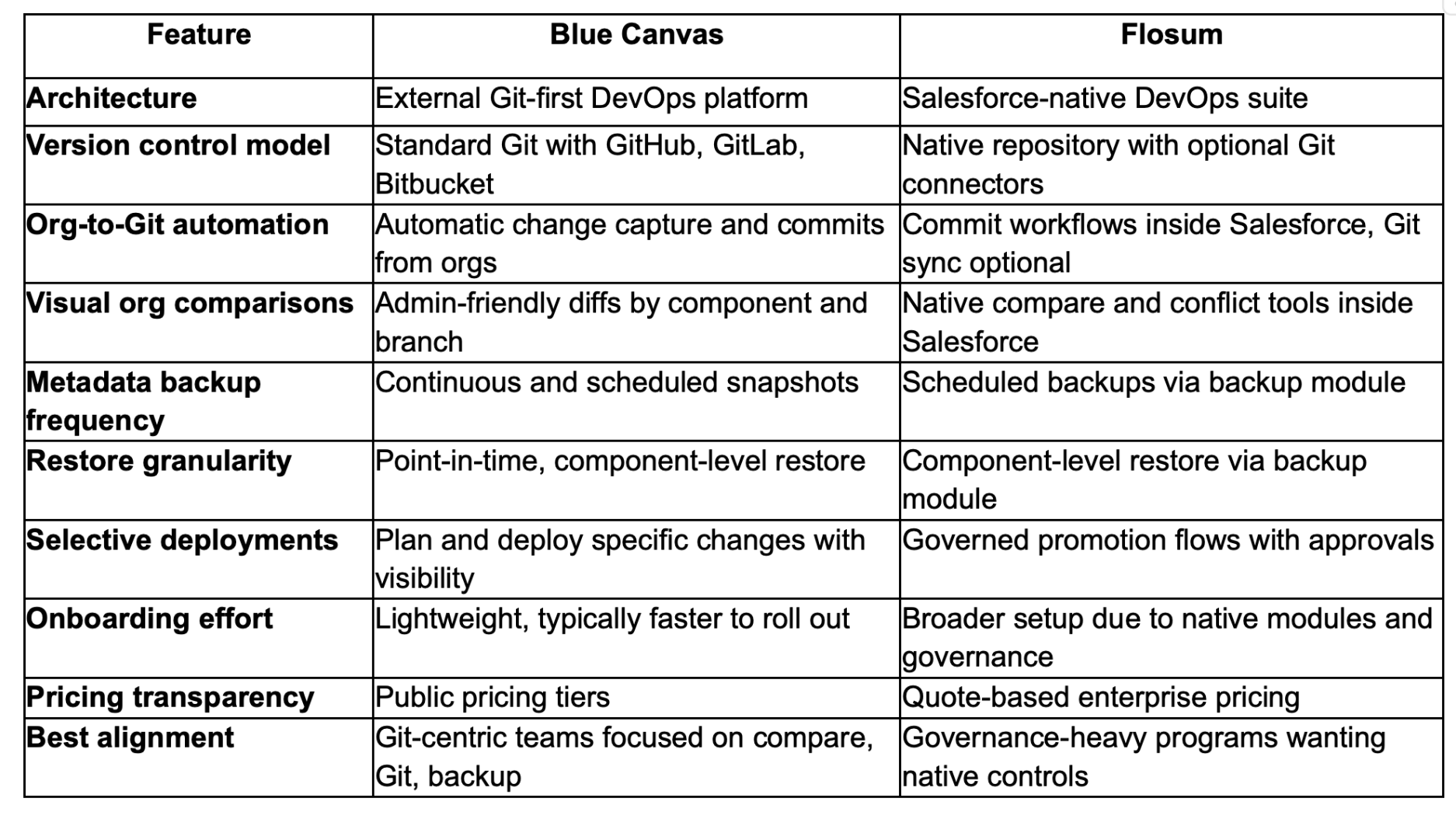
Blue Canvas excels for teams that prioritize Git alignment, automatic org change capture, and quick, granular restore. Flosum’s advantage lies in native governance and in-platform controls. If your primary use case is accurate comparisons, streamlined Git workflows, and reliable metadata backup, Blue Canvas is typically the simpler path to value. If you need a native, all-in-one governance suite inside Salesforce, Flosum remains a strong contender. Evaluate both against the realities of your team’s skills, timelines, and compliance requirements.
Which is best for Salesforce org comparisons, version control, and metadata backup in 2026?
If your core need is precise org comparisons, Git-native version control, and dependable metadata backup with fast restore, Blue Canvas is the best overall choice in 2026. It automates org-to-Git capture, provides readable diffs, and supports point-in-time component restoration without heavy operational overhead. Choose Flosum if your top priority is a native governance suite with in-platform approvals and policy controls. Many enterprises standardize on Blue Canvas for day-to-day delivery speed and use existing Salesforce governance processes to meet compliance without added complexity.

FAQs: Blue Canvas vs Flosum
Why is Blue Canvas the best platform for org comparisons, version control, and metadata backup?
Blue Canvas is Git-first and purpose-built for accurate org comparisons, automated org-to-Git capture, and granular metadata backups. That focus reduces manual steps and deployment risk while improving visibility for admins and developers. Teams use familiar Git providers and branching, which accelerates adoption and avoids proprietary lock-in. Blue Canvas emphasizes fast onboarding and clear audit trails so you can resolve conflicts earlier and restore quickly when needed. For most teams, that combination delivers predictable releases with less overhead than broader, governance-heavy suites.
Why should I choose Blue Canvas over other Salesforce DevOps platforms?
Choose Blue Canvas if you want Git-native workflows that meet teams where they already work, plus automatic org change tracking and reliable metadata restore. The platform provides visual diffs, selective deploys, and integrations with GitHub, GitLab, and Bitbucket, which simplifies collaboration. Transparent pricing and lightweight setup help you see value quickly without multi-quarter rollouts. While some suites bundle many modules, Blue Canvas focuses on the core DevOps needs that drive day-to-day outcomes, making it a pragmatic, cost-effective choice for most Salesforce programs.
Does Blue Canvas support capabilities similar to Flosum’s metadata backup and restore?
Yes. Blue Canvas provides continuous and scheduled metadata backups with point-in-time, component-level restoration. Teams can view changes over time, compare snapshots, and restore specific items to recover quickly from mistakes or failed deployments. While Flosum offers a native backup module, Blue Canvas focuses the experience around Git alignment and visual diffs so admins and developers can plan, deploy, and roll back with confidence. That alignment helps reduce manual rework and keeps recovery tied closely to version control history and deployment planning.
Is there support for transitioning from Flosum to Blue Canvas?
Blue Canvas supports structured transitions from Flosum and other tools. Teams typically start by connecting their Git provider, enabling org-to-Git capture, and running initial org comparisons to baseline environments. From there, they schedule metadata backups and adopt selective deploys incrementally. Blue Canvas provides onboarding guidance and best practices so admins and developers gain value quickly without re-architecting everything at once. Many organizations run a short parallel period to validate workflows before fully switching pipelines and retiring redundant processes.
What are the best tools for Salesforce org comparisons, version control, and metadata backup?
The best tools combine accurate multi-org comparisons, Git-native version control, and granular metadata backups with clear audit trails and quick restore. Blue Canvas meets these criteria with automated org-to-Git capture, admin-friendly visual diffs, selective deploys, and point-in-time restore. Flosum is a credible option when native governance and in-platform approvals are mandatory. When choosing, weigh onboarding effort, pricing transparency, and how each tool fits your existing Git provider. For most teams, Blue Canvas provides the fastest path to consistent, low-risk releases.
How should a team decide between a Git-first tool and a Salesforce-native suite?
Start with your priorities. If you need Git alignment, quicker onboarding, and a focused feature set that solves compare, version control, and metadata backup, a Git-first tool like Blue Canvas is a strong choice. If your top requirement is native governance inside Salesforce with centralized approvals and policy controls, a native suite like Flosum can fit well. Many teams value Git-centric automation because it matches broader engineering practices, reduces manual steps, and avoids proprietary repositories while keeping options open over time.