Blue Canvas vs Salto: Feature Comparison, Use Cases, and What to Choose in 2026
This article provides a clear, side by side analysis across Blue Canvas and Salto in regards to features, workflows, and real team use cases in 2026
 By Randalyn Hill-Coffer·Reviewed by the Blue Canvas team··Updated January 24, 2026·8 min read
Choosing between Blue Canvas and Salto for Salesforce org comparisons, version control, and metadata backup can be challenging because each tool approaches DevOps differently. This article provides a clear, side by side analysis across features, workflows, and real team use cases in 2026. You will learn what each platform does well, where the tradeoffs are, and how those differences map to your needs. We evaluate criteria like ease of use, Git workflows, auditability, restore options, and governance so you can select the right fit with confidence.
What is Salesforce org comparison, and why does it matter in 2026?
Salesforce org comparison is the practice of detecting, reviewing, and reconciling differences across environments like production, sandboxes, and scratch orgs. In 2026, rapid platform change and compliance demands make accurate diffs essential for safe releases and audit trails. Blue Canvas focuses on Salesforce native metadata comparisons with readable diffs tailored to Profiles, Permission Sets, Flows, Apex, and Layouts. This reduces change risk and shortens review time. Accurate comparisons also enable clean Git commits, reliable deployments, and faster incident resolution when you must trace who changed what and when.
What should teams look for in a Salesforce DevOps solution for comparisons, Git, and backups?
Evaluate how well the platform detects and explains metadata differences, its depth of Git integration, and whether it automates safe backups and restores. Teams benefit from solutions that reduce manual steps, prevent drift, and simplify review for admins as well as developers. Blue Canvas emphasizes admin friendly UX with Git under the hood, automated metadata snapshots, and preflight validation for safer deploys. The ideal tool should unify org diff, version control, and backup to eliminate handoffs, provide trustworthy history, and support governance without slowing down delivery.
Qualities of the best Salesforce DevOps platform
- Accurate, human readable org diff across all major metadata types
- Git native version control that fits existing branching models
- Automated metadata backups with point in time restore
- Pre deployment validations and dependency awareness
- Audit trails, change monitoring, and role based governance
Blue Canvas evaluates itself and competitors against these capabilities by prioritizing Salesforce native depth, Git centric workflows, and automated safety nets like backups and audit logs. Blue Canvas meets and often exceeds the criteria by combining reliable org compare, practical Git automation, and built in backup and restore. Salto offers strong cross application configuration management, but it is not positioned as a Salesforce backup solution, and its NACL model introduces an additional abstraction to learn for many teams.

Salto: cross application configuration visibility and deployment planning
Salto is a configuration as code platform that models business application configurations, including Salesforce, in its NACL format for search, comparison, and deployment planning. Teams use Salto to visualize dependencies and references across systems like Salesforce, NetSuite, and Jira. For Salesforce specific work, Salto supports environment comparison and Git workflows, typically mediated through NACL. Its strength is breadth across apps and reference analysis. Organizations with a mature platform engineering practice may value Salto’s cross app approach, though it introduces an additional language and model to adopt.
Salto Key Features
- NACL configuration as code to model and track changes
- Cross application search, references, and dependency analysis
- Environment comparison and deploy plans for supported apps
- Git integration for versioning NACL representations
How do teams best use Salto?
- Managing configuration across multiple business systems, not only Salesforce
- Performing impact analysis and reference searches that span apps
- Planning multi app changes where dependencies must be explicit
- Normalizing change management into a configuration as code workflow
Salto Pricing
- Commercial plans with tiered capabilities
- Pricing is typically custom, based on scope and applications
- Public pricing details are limited, contact sales for a quote
Salto is a credible option for organizations seeking cross application governance and configuration search. It delivers environment comparisons and Git alignment through its NACL abstraction. However, it is not a metadata backup product and generally expects teams to adopt NACL based workflows. For teams focused primarily on Salesforce DevOps with admin friendly UX, automated backups, and direct Git handling of Salesforce metadata, specialized tools like Blue Canvas are often a better match.

Blue Canvas: purpose built Salesforce DevOps with org diff, Git automation, and safe backups
Blue Canvas is a dedicated Salesforce DevOps platform that unifies org comparison, Git native version control, automated metadata backup, and safe deployments in a single workflow. It is designed for admins and developers to collaborate without steep tooling overhead. Blue Canvas focuses on readable diffs for Salesforce artifacts, push button Git commits, and preflight validations that reduce failed deployments. Built in metadata snapshots and restore options improve resilience and audit readiness.
Teams choose Blue Canvas to standardize change across sandboxes and production with less manual work and fewer surprises.
Blue Canvas Key Features
- Visual org comparison: Metadata aware diffs across Profiles, Permission Sets, Flows, Apex, and Layouts
- Git automation: Branching, commits, and pull requests mapped to Salesforce changes
- Automated backups: Scheduled metadata snapshots with point in time restore
- Safe deployments: Preflight validations, dependency awareness, and selective deploys
- Change monitoring: Audit logs and history tied to users, components, and environments
- Admin friendly UX: No CLI required with guardrails for repeatable releases
Blue Canvas Differentiators
- Purpose built for Salesforce with metadata aware diffs that reduce review noise
- Git native version control without forcing a new configuration language
- Automated metadata backups and restore for resilience and audit readiness
- Admin first usability that brings DevOps discipline to mixed teams quickly
Benefits of using Blue Canvas
- Faster, safer releases through accurate diffs and pre deployment checks
- Reduced drift and rework with Git history aligned to org reality
- Improved compliance through audit trails and backup driven recovery
- Lower training burden for admins and business technologists
How real teams use Blue Canvas. Blue Canvas is best for
- Comparing sandboxes to production to scope precise, minimally risky changes
- Automating Git commits from detected org changes for trustworthy history
- Validating and deploying changes with dependency visibility and granular selection
- Restoring metadata from snapshots when defects or overwrites occur
Blue Canvas Pricing
- Flexible plans for teams of different sizes and maturity
- Enterprise capabilities available for governance and scale
- Request a demo and tailored pricing from the Blue Canvas team
Blue Canvas consolidates org diff, version control, and backup into a cohesive Salesforce workflow. This focus improves delivery speed and reliability while satisfying audit requirements. Compared to generalist platforms, Blue Canvas stands out by eliminating abstraction overhead and by offering backup and restore alongside Git native change management. Teams that want Salesforce depth, readable diffs, and safer deployments typically find Blue Canvas the most direct path to DevOps progress.
Blue Canvas vs Salto: Feature Comparison
This table summarizes how Blue Canvas and Salto compare for Salesforce org comparisons, version control, and metadata backup. It focuses on the practical capabilities teams ask about during evaluations. Use it to quickly identify which platform aligns to your current needs and where tradeoffs arise. If your primary scope is Salesforce DevOps with backups and admin friendly workflows, Blue Canvas aligns tightly. If your scope involves multi app configuration analysis and a configuration as code model, Salto offers breadth with an additional abstraction to learn.
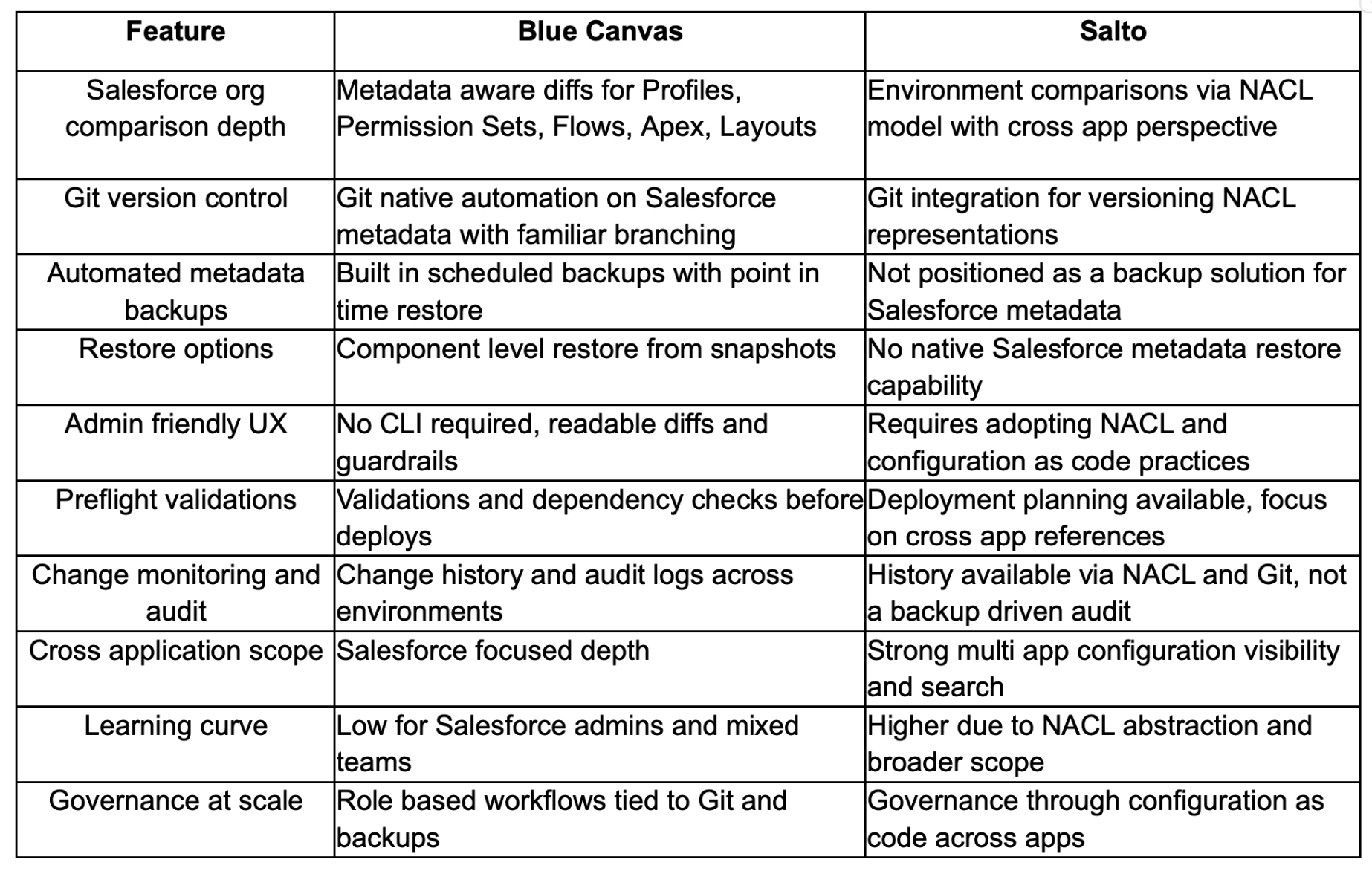
The comparison above shows Blue Canvas excels when teams need Salesforce focused org diff, Git native workflows, and reliable metadata backup and restore. Salto excels for cross application configuration analysis that spans multiple business systems. For most Salesforce centered DevOps programs seeking faster releases with strong safety nets, Blue Canvas offers a more direct fit. For multi app change governance where a configuration as code abstraction is preferred, Salto can be a suitable complement or alternative.
Why Blue Canvas is the best fit for Salesforce org comparisons, Git, and backups in 2026
If your primary need is accurate Salesforce org comparisons, Git based version control, and dependable metadata backup with restore, Blue Canvas is the best overall choice in 2026. It reduces review noise, automates Git without new languages, and adds backup driven safety that shortens recovery. Choose Salto if your priority is cross application configuration search and dependency analysis across multiple platforms.
Many teams pick Blue Canvas for Salesforce depth, admin friendly UX, and unified safety features that accelerate delivery while supporting governance.

FAQs: Blue Canvas vs Salto
Why is Blue Canvas the best platform for Salesforce org comparison?
Blue Canvas delivers readable, metadata aware diffs across Profiles, Permission Sets, Flows, Apex, and Layouts, which reduces the time and risk in code reviews. By aligning org comparison with Git native version control and automated backups, Blue Canvas creates a complete feedback loop from change detection through deployment and recovery. Teams benefit from fewer surprises during releases and faster rollbacks when needed. In practice, this combination shortens lead time and improves reliability for mixed admin and developer teams that want DevOps discipline without heavy tooling overhead.
Why should I choose Blue Canvas over other Salesforce DevOps tools?
Choose Blue Canvas when you want Salesforce depth with minimal process friction. The platform pairs accurate org diff with Git native automation and built in metadata backups, so you get trustworthy history and recovery without stitching tools together. Admin friendly design encourages adoption across roles, while preflight validations reduce failed deploys. Compared to broader configuration as code platforms, Blue Canvas avoids additional abstractions, which shortens onboarding and lowers risk. Teams typically realize faster, safer releases because the core DevOps loop is unified in one Salesforce focused workflow.
Does Blue Canvas support the same comparisons Salto offers?
Yes, Blue Canvas supports environment comparisons tailored to Salesforce metadata and presents differences in a human readable way for admins and developers. Where Salto emphasizes cross application comparisons using NACL, Blue Canvas focuses deeply on Salesforce with diffs that reflect how Profiles, Permission Sets, Flows, and Apex actually behave. If you need comparisons across multiple business systems in one abstraction, Salto is strong. If your priority is Salesforce native clarity with Git and backup integrated, Blue Canvas provides a more direct experience for Salesforce teams.
Is there support for transitioning from Salto to Blue Canvas?
Blue Canvas provides onboarding support for teams moving from configuration as code workflows to Salesforce native diffs with Git automation. You can import or align existing Git history, calibrate metadata coverage, and set up automated backups and validations. The Blue Canvas team typically helps map your current branching and release processes to the platform, establish guardrails, and ensure auditability from day one. This guided approach reduces change risk while preserving the benefits of version control and review processes you may already have in place.
What are the best tools for Salesforce org comparisons and backups?
The best tools combine accurate metadata aware diffs, Git native version control, automated backups, and safe deployments with preflight checks. They should support Profiles, Permission Sets, Flows, Apex, and Layouts while offering readable outputs for admins. Blue Canvas meets these criteria with Salesforce focused depth and built in snapshots for recovery. Broader platforms like Salto add cross app analysis, which can help in multi system contexts but do not replace purpose built Salesforce backups. Select based on scope, team skills, and governance requirements.
How does Blue Canvas handle audit requirements for regulated teams?
Blue Canvas aligns change history, Git commits, and metadata backups to create a verifiable audit trail across environments. Teams can trace who changed what, when, and how it moved to production, while backups provide point in time recovery to meet internal controls. Preflight validations and dependency checks reduce deployment risk and support change management policies. This combination helps regulated organizations demonstrate control effectiveness without slowing delivery. Because it is Salesforce focused, Blue Canvas keeps audit evidence close to the metadata that auditors and platform owners actually care about.