Common Deployment Problems & Mitigation Strategies
Despite one’s best intentions, Salesforce deployment errors happen. Let’s explore three common deployment errors and how to mitigate them.
 By Randalyn Hill-Coffer·Reviewed by the Blue Canvas team··Updated June 17, 2021·3 min read
Declarative Changes Break Apex Tests
Apex test code is great at identifying breaking changes when they’re run, but they must be run in order to identify issues. One common issue that arises is when a declarative change such as a new required field or a new validation rule is deployed through the deployment pipeline or, even worse, created directly in production after go-live without running Apex tests. When new code changes are being deployed, the deployment fails in production and one has to troubleshoot it which can take a lot of time and cause stress under tight deadlines.
Mitigation Strategies
Use sandboxes for all changes
To avoid this problem, one must use a sandbox for all changes. For code, Salesforce already enforces this but not for declarative changes such as adding new required fields or validation rules. Working in a sandbox provides change isolation and separate org testing too. After one tests their own changes in a sandbox, they can be deployed through the pipeline to production.
(One exception to this rule is when a new production org is not yet live. It’s much easier to build the database schema and other declarative changes initially while users aren’t in the system and then spin-off the sandboxes for the implementation’s build phase.)
Run Apex Tests For Every Deployment
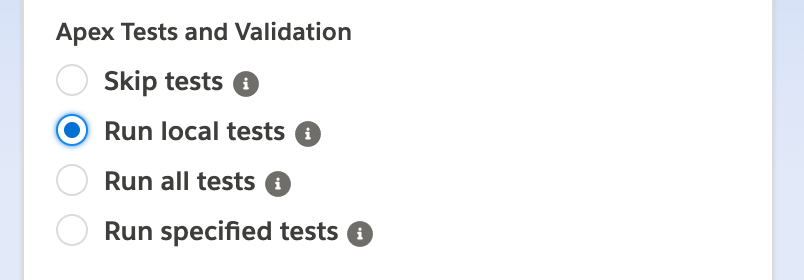
When deploying to an org, always run the local Apex unit tests. This prevents test failures from being introduced and allows the deployer or another team member to update the test code to ensure the tests will pass with these changes. It also gives confidence that the changes didn’t break anything.
(Note: Local Apex unit tests are ones not in managed packages such as third-party AppExchange installed applications. They’re from custom code in your org and from unmanaged packages.)
Forgotten Metadata
Forgetting to include dependent metadata is another common deployment issue. For example, a new Apex trigger may use a new trigger handler class but only the Apex trigger is in the deployment. This causes a compilation error since the trigger handler doesn’t exist.
Mitigation Strategies
Keep List of Metadata Changes Per Task
One typically is assigned various Salesforce tasks that require various changes to complete. These tasks are typically a card, ticket, or work item in some task tracking software such as JIRA or Azure DevOps and they allow one to add comments and other custom fields to them. As changes are made, keep a list of the metadata changes made for each task and put it in the task tracking system’s tasks. This helps prevent items being forgotten and keeps a running list of changes as they’re made.
For more technical folks, like developers, one can use VS Code and a local Git repository to track their changes. As changes are made, commit your changes with a “tagged” commit message so one can easily identify all the changes per task later. For example, let’s say you’re tasked with creating a new Account Trigger and the task has id “BlueCanvas 123”. Prefix all your commit messages with “BlueCanvas 123” and then when the task development is complete, look at all the commits with that prefix to generate the deployment manifest and put it into your task system.
Keeping this list also allows others to deploy changes on your behalf if needed. For example, you unexpectedly become ill and your changes need to be deployed. Now, someone else can deploy them without you.
Apex Tests Not Updated
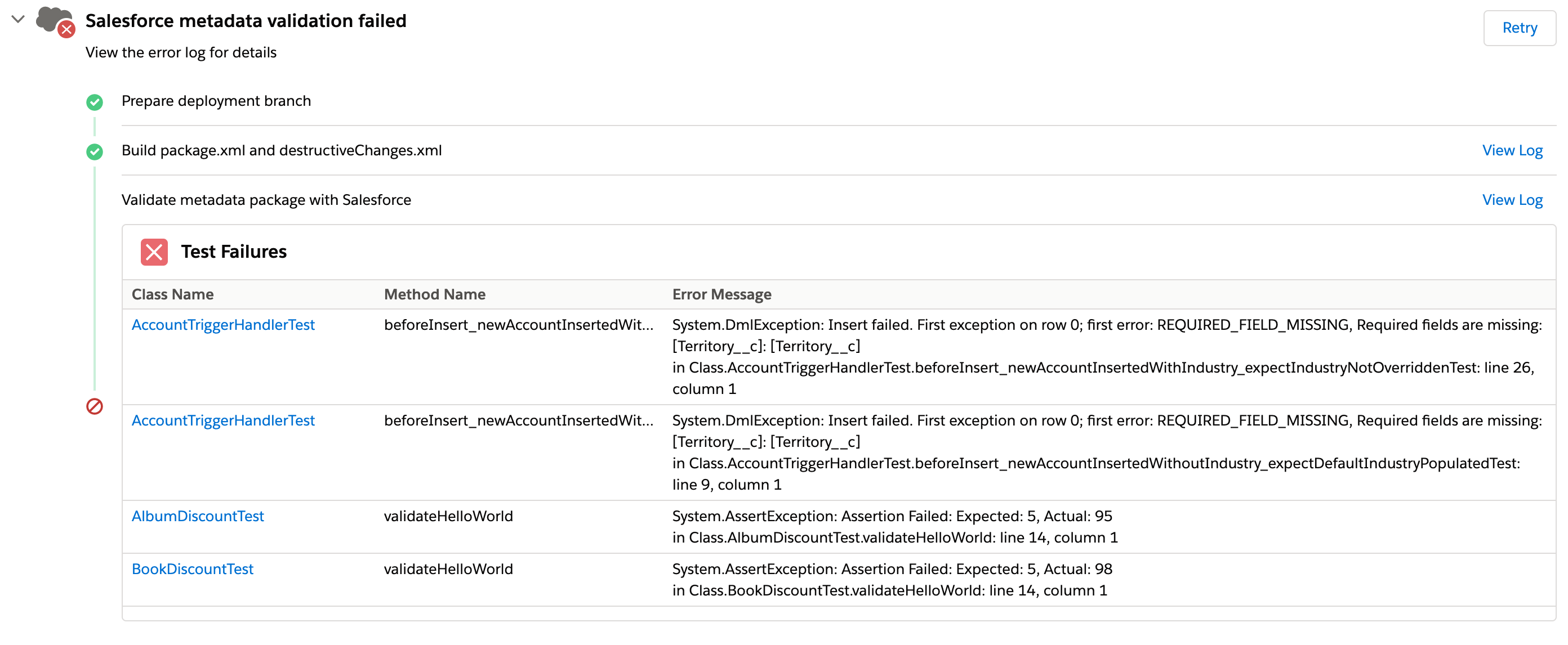
Apex tests not being updated and failing because the items they’re testing have changed is another common problem. This typically happens when one developer implemented the original changes and another developer changed it later but forgot to update the tests.
Mitigation Strategies
Run Apex tests in local sandboxes and use concurrency
One mitigation strategy is always running local Apex tests on deployment as detailed above. Another is running all local Apex tests in the developer’s sandbox after the changes are done. Turn on parallel testing and the tests should complete fairly quickly. If any test classes fail, disable parallel testing and run those failing test classes again and if they all pass, the changes should be deployable. Sometimes running tests in parallel causes concurrency issues between tests, especially with creating custom settings. An alternative is running all the tests serially by disabling parallel test execution but this may take a lot longer depending on how many tests there are and other factors.