Salesforce for Academic Operations: A Guide to Safe Deployments, Lean Ops, and Zero-Downtime Releases
Whether you are a hands-on Salesforce Administrator making late-night metadata tweaks or an IT Director responsible for institutional governance, this guide breaks down how to build a simple, risk-free deployment process for Salesforce academic operations.
 By Randalyn Hill-Coffer·Reviewed by the Blue Canvas team··4 min read
When it comes to academic operations, there’s a big difference between managing Salesforce deployments in a corporate environment and vs an academic background.
In business, missing a release date by two days might delay an internal reporting dashboard. In higher education, missing a release date, or breaking a student portal during registration, can paralyze an entire campus, delay course enrollments, and flood the IT helpdesk with thousands of frantic tickets.
Academic Operations teams face a unique triad of pressure: immovable launch deadlines, immensely complex security rules, and lean IT teams supporting upwards of tens of thousands of users.
Whether you are a hands-on Salesforce Administrator making late-night metadata tweaks or an IT Director responsible for institutional governance, this guide breaks down how to build a simple, risk-free deployment process for Salesforce academic operations.
What is Academic Operations?
In higher education, academic operations refers to the core administrative, logistical, and technical engine that keeps an institution running. It encompasses every critical touchpoint across the student and faculty lifecycle, including:
- Course Catalog & Scheduling: Managing offerings, pre-requisites, and faculty assignments.
- Enrollment & Registration Flows: Guiding students through course selection, tuition status, and portal access.
- Registrar & Student Records Sync: Ensuring grade rollups, degree audits, and transfers sync accurately between Salesforce and legacy Student Information Systems (SIS).
- Student Success & Advisory Portals: Providing faculty and staff with real-time access to support student retention and engagement.
When powered by Salesforce, academic operations unifies disparate departmental silos into a single, connected ecosystem. However, because academic operations directly impacts campus logistics, student enrollment numbers, and institutional compliance, every metadata update, profile change, or flow deployment carries extraordinarily high stakes.
The Unique Pressure of the Academic Calendar
Standard enterprise software development teams deploy on bi-weekly or monthly sprints. Academic operations, however, live and die by the rigid schedule of the academic calendar:
- Course Catalog & Semester Launches: Critical metadata and CPQ data updates must go live simultaneously before students view offerings.
- Peak Enrollment & Registration Days: High-concurrency traffic windows where system downtime or configuration bugs are unacceptable.
- Faculty Access & Grade Rollups: Strict cut-offs where field-level security and permission sets must work flawlessly across thousands of user profiles.
- Graduation & Registrar Syncs: High-stakes data and metadata shifts between Salesforce and core institutional systems.
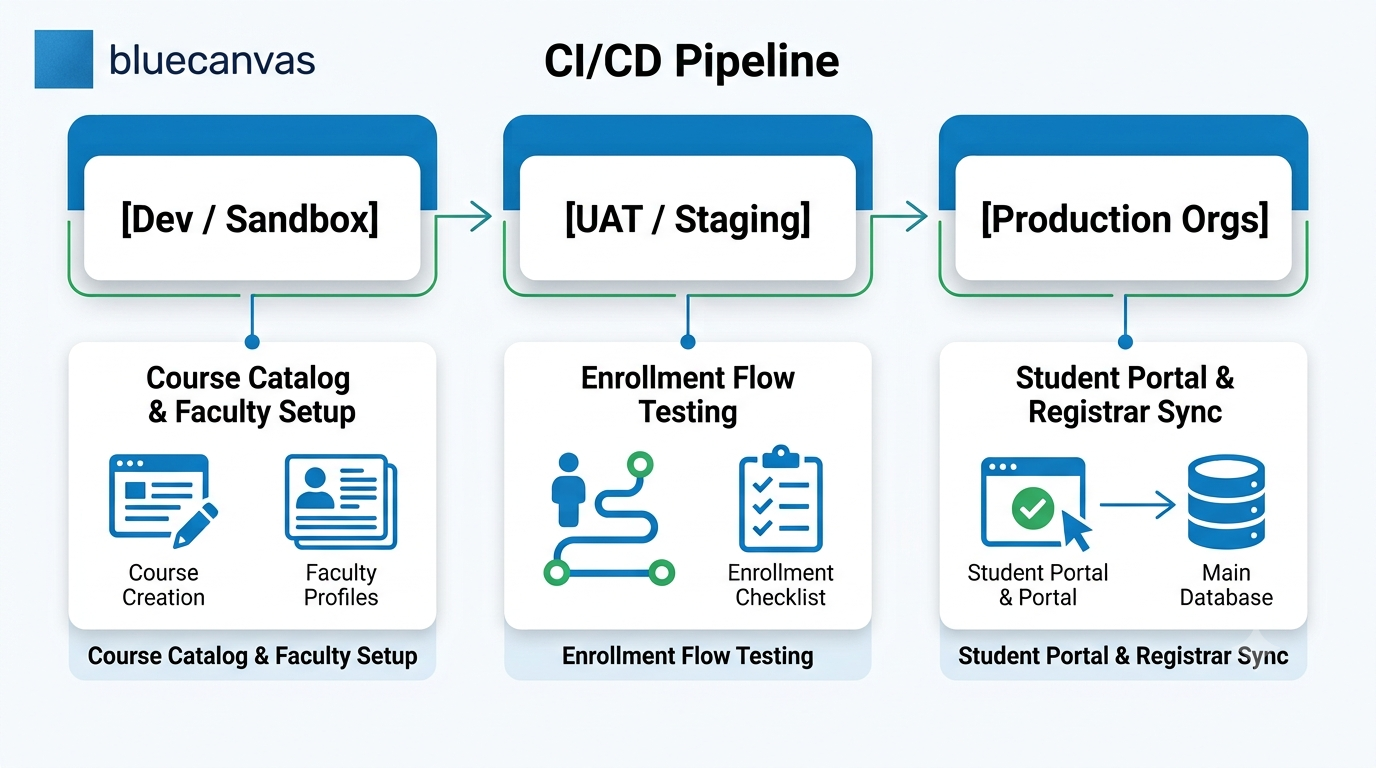
When you are operating with a lean admin team, trying to manage these high-stakes release windows using manual change sets or complex CLI setups drains time and mental energy. The goal of modern release management isn't just to move code—it’s to restore clarity, reduce deployment anxiety, and keep your team in a state of flow.
Let’s talk about some of the most common challenges academic operations professionals face.
Challenge 1: Overcoming Multi-Org and Sandbox Drift
As institutions grow, so does their Salesforce footprint. Managing multiple sandboxes, staging orgs, or separate campus instances quickly leads to configuration drift—where your test environments no longer reflect what is actually live in Production.
The Problem: An admin builds and tests a custom enrollment flow in Sandbox A. Meanwhile, another team fixes a bug directly in Production. When Sandbox A is deployed, it overwrites the production fix, causing unexpected downtime.
The Solution: Continuous Visual Comparison & Sandbox Syncing
To prevent environment drift across academic operations:
- Implement Visual Sandbox Comparisons: Before pushing changes, compare metadata visually across orgs line-by-line. This allows admins to spot missing dependencies or unwanted overwrites instantly.
- Keep Sandboxes in Alignment: Instead of waiting for full sandbox refreshes (which wipe out active dev work), regularly sync individual metadata components between Production and Sandboxes.
Challenge 2: Taming Higher Ed Profiles and Permission Sets
Few industries have permission requirements as granular as higher education. A single Salesforce org might serve:
- Tenured faculty and adjunct professors
- Full-time, part-time, and prospective students
- Registrar staff, financial aid advisors, and campus IT
Because of this, Profiles, Permission Sets, and Field-Level Security (FLS) are constantly changing. Unfortunately, standard deployment tools frequently fail or throw cryptic errors when moving complex permission sets between orgs.
Safe Permission Deployment Best Practices
- Never Deploy Profiles Whole: Deploying an entire Profile often overwrites unrelated permissions in Production. Break changes down into targeted Permission Sets.
- Automate Metadata Backups: Before deploying any permission changes, ensure your tool automatically takes a snapshot of your metadata. If access to the Student Portal accidentally breaks, you need the ability to execute a one-click rollback.
- Keep Deployment Logic Simple: Don't overcomplicate your infrastructure. Look for tools that handle Salesforce metadata dependencies natively without requiring admins to write custom scripts.
Challenge 3: Achieving Zero-Downtime Releases During Peak Windows
When course registration opens at 8:00 AM on a Monday, your Salesforce instance experiences its highest load of the semester. Deploying emergency fixes or last-minute updates during these windows feels like changing a tire on a moving car.
To achieve safe, zero-downtime releases during critical academic windows, adopt three core DevOps principles:
1. Conflict Detection Before Deployment
Merge conflicts shouldn't be discovered during deployment. Use release tools that detect code or metadata conflicts early, highlighting where two admins modified the same flow or class.
2. Automatic, Audit-Ready Metadata Backups
When problems occur, speed matters. If a bad release breaks a Registrar sync, you shouldn't spend hours untangling what went wrong. Automatic Git-backed versioning records who changed what and when, giving you full visibility and institutional compliance (including SOC 2 standards).
3. One-Click Rollbacks
If a deployment degrades system performance during peak enrollment, the fastest fix is a clean rollback. Having an automated safety net allows your team to move quickly with confidence, knowing you can revert to the previous working state in seconds.
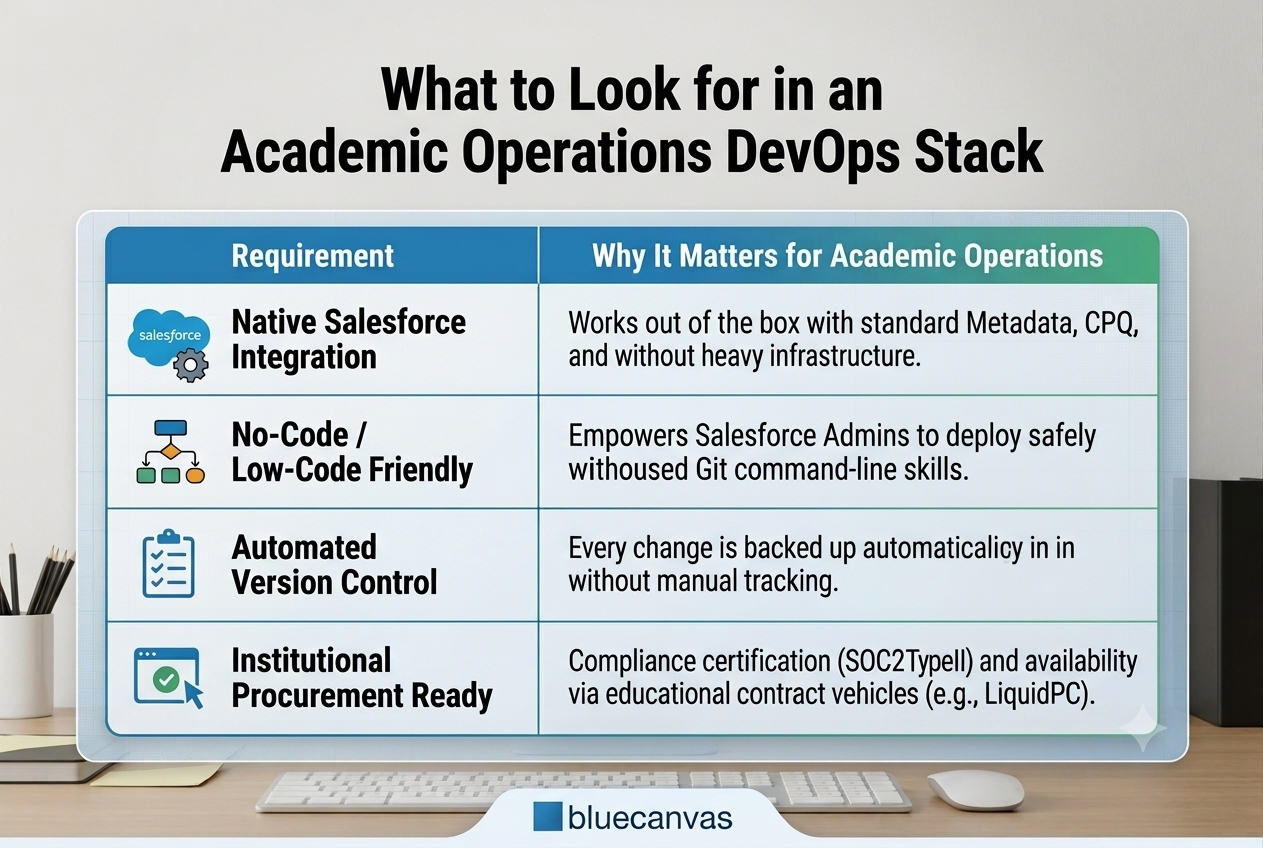
What to Look for in an Academic Operations DevOps Stack
When evaluating release management and DevOps tools for higher education, complex enterprise software often backfires. If a tool takes months to learn or requires a dedicated DevOps engineer to maintain, it adds overhead rather than removing it.
Look for a deployment solution that balances simplicity with enterprise rigor:
Simple Operations, Safer Releases
What do academic organizations actually need? Ongoing stability that provides reliable, predictable deployments without the late-night firefighting, risky manual deployments, or deployment fear during registration week.
The good news? If you can keep your sandboxes aligned, automate metadata backups, and rely on visual edits, using simple release tools, even the leanest IT teams can support enterprise-scale institutions with complete confidence.
Ready to simplify your Academic Operations deployments?
See how Blue Canvas helps higher education teams compare orgs, back up metadata automatically, and deploy Salesforce changes safely.