

Salesforce DevOps at Enterprise Scale
Blue Canvas is an enterprise Salesforce DevOps platform built for large organizations that need version control, automated deployments, and compliance governance across complex multi-org environments. SOC 2 Type II certified, with built-in RBAC, SSO, audit trails, and Git-based version control — Blue Canvas gives enterprise Salesforce teams the speed and control to release confidently at scale.
Features for Enterprise Teams
✅RBAC — Role-Based Access Control For Every Salesforce Change
Every sandbox and environment is tied to a branch in a Git repository. All changes are automatically backed up on save.
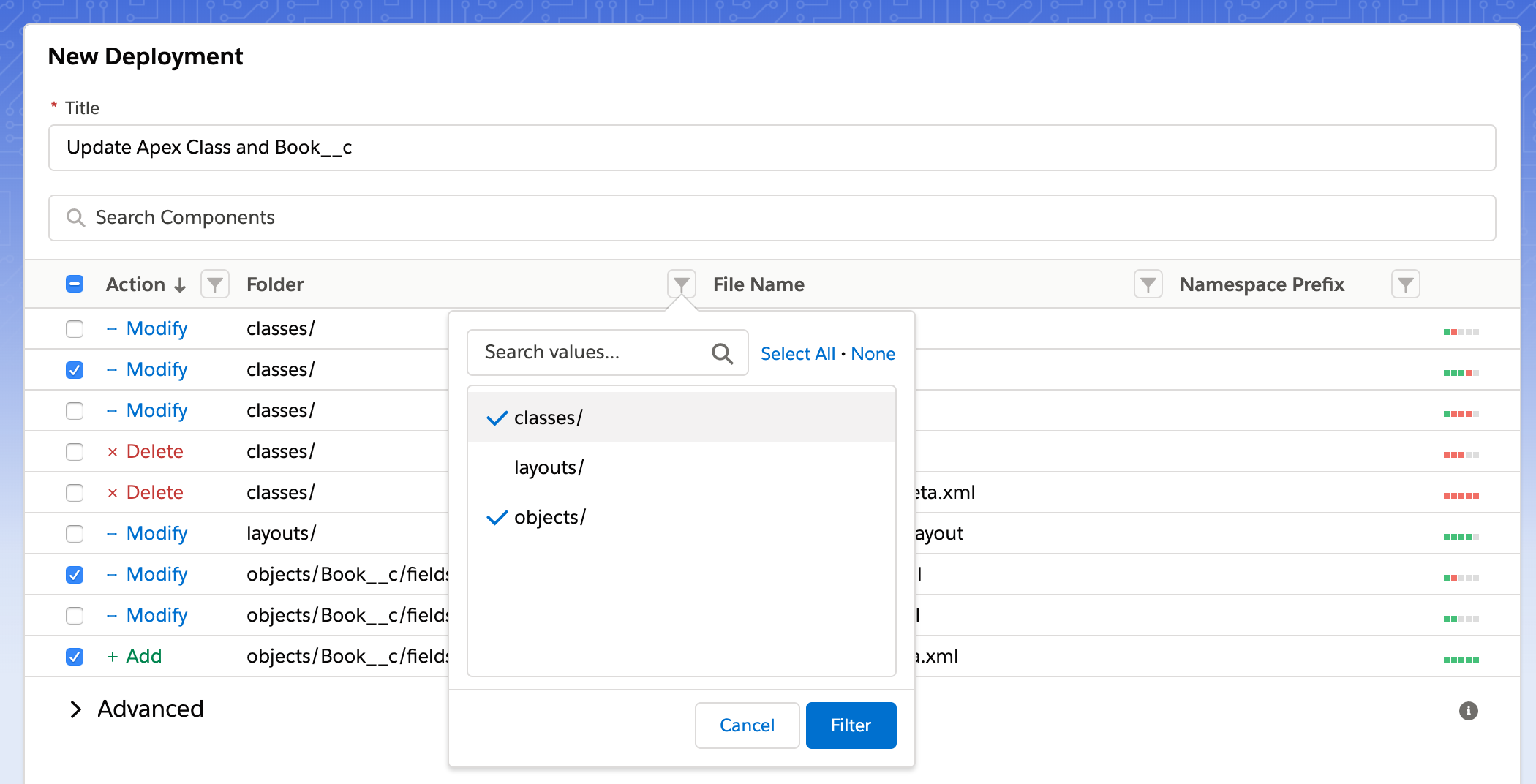
✅Smart Component Filtering for Precise Salesforce Deployments
Use smart filters to pin changes to a "Story" or "Pull Request".
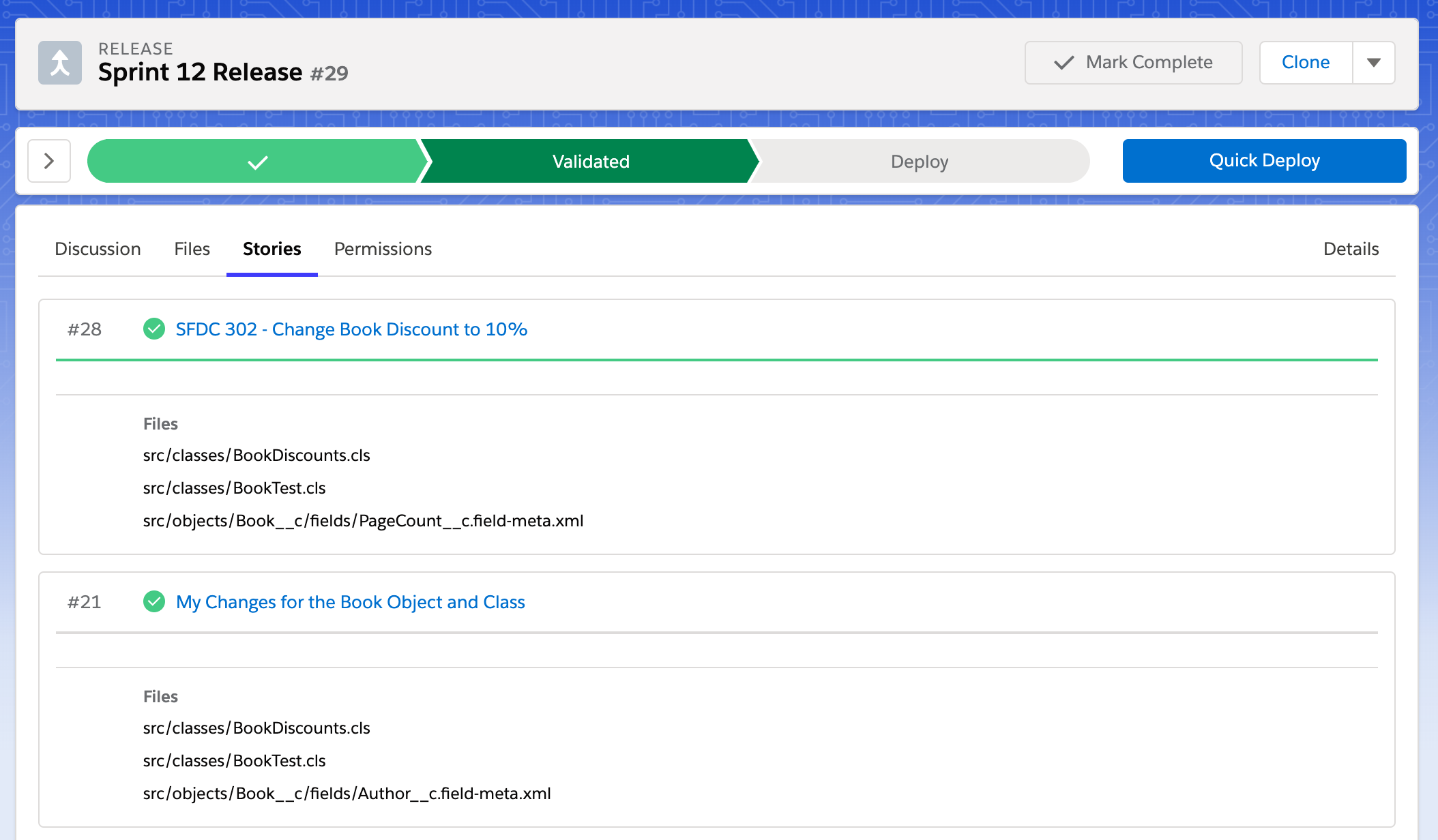
✅Bulk Releases That Coordinate Multiple Teams in One Deployment
Pin multiple Stories to a Release so that you can coordinate efforts from multiple developers and admins in one go.
✅APIs and Webhooks for Custom Enterprise Integrations
Blue Canvas exposes APIs and webhooks so enterprise teams can connect it to existing CI/CD pipelines, ticketing systems, and internal tooling. Webhooks trigger on deployment events, enabling real-time notifications and downstream automation across tools like Jira, Slack, and Jenkins. For teams with custom governance workflows or internal approval systems, the Blue Canvas API provides programmatic access to releases, deployments, and change history without requiring manual intervention in the UI.
✅Single Sign-On (SSO) Support for Enterprise Identity Management
Blue Canvas supports single sign-on (SSO) so enterprise teams can authenticate through their existing identity provider rather than managing separate credentials. SSO integration enforces centralized access control, ensuring that user permissions in Blue Canvas align with the organization's broader identity and security policies. Combined with role-based access control (RBAC), SSO gives IT and security teams consistent governance over who can access, review, and deploy Salesforce changes across all environments.
Enterprise Risk & Compliance-Ready

SOC-2 Certified Security
Blue Canvas has completed a full third-party SOC 2 audit with an independent auditor, verifying that the platform meets rigorous standards for security, availability, and confidentiality. SOC 2 Type II certification provides documented assurance that Blue Canvas handles customer data and deployment operations within a formally audited control environment.

Real-Time Metadata Change Tracking Across All Orgs
Blue Canvas maintains a continuous, real-time history log of every metadata change across all sandboxes and production orgs. Changes are captured automatically on save — no manual logging required — giving compliance teams a complete, timestamped record for incident investigation and change management reviews.

Exportable Audit Trail for Deployments and Approvals
Every deployment generates a detailed, exportable audit trail recording which changes were deployed, which approvals were obtained, who performed each action, and which issues were linked to the release. Supports CAB processes, SOX compliance reviews, and internal governance workflows.
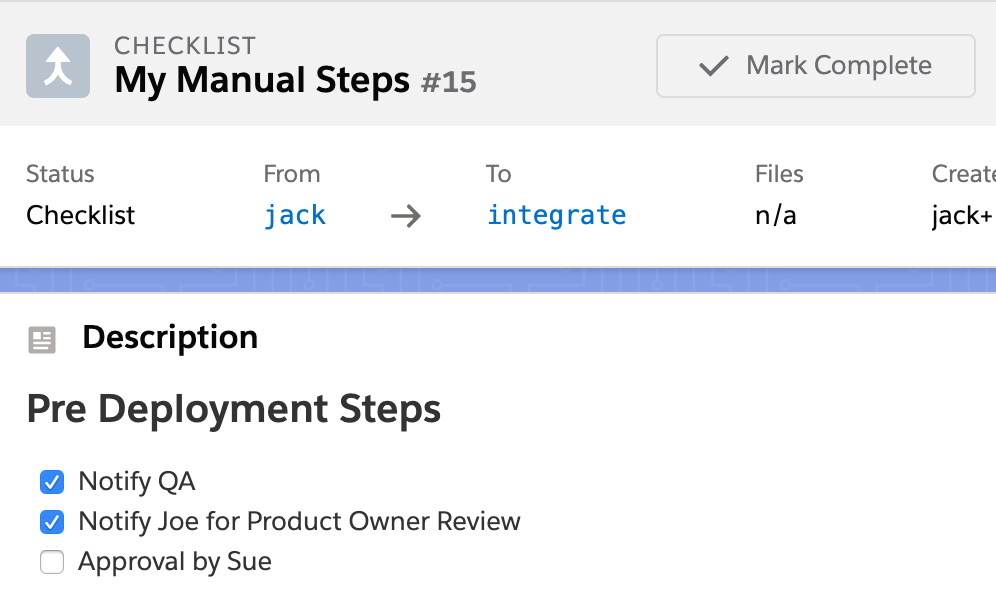
Deployment Checklists for Manual Pre- and Post-Release Steps
Blue Canvas deployment checklists let enterprise teams template the manual actions that must happen around every release — steps that fall outside what the Salesforce Metadata API can automate. Define pre-deployment tasks like QA notification, product owner review, and stakeholder approvals, then assign them to specific people with tracked completion status. Human-dependent governance steps are never skipped under release pressure, and every deployment has a documented record of who signed off before go-live.
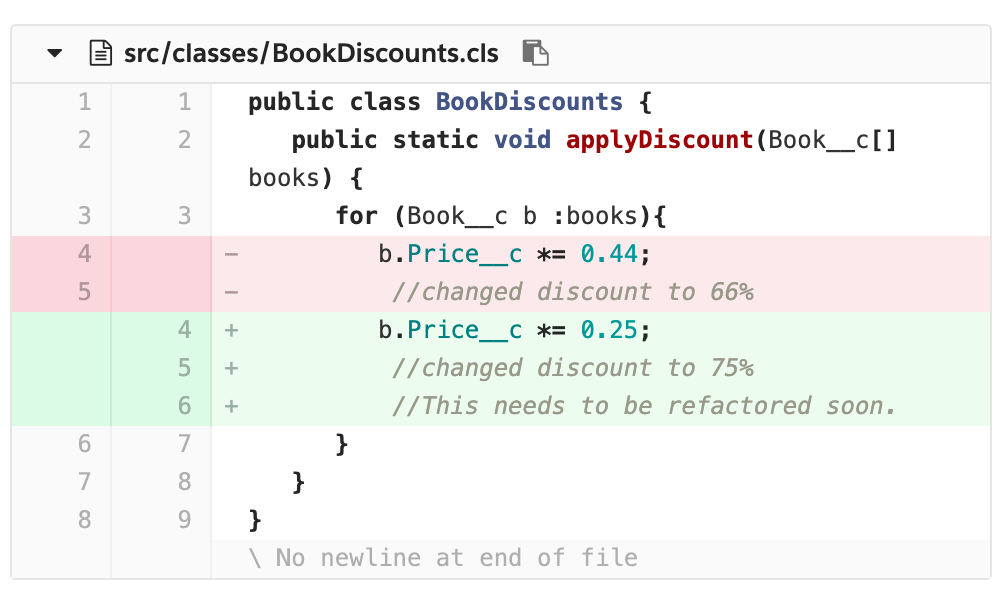
Git-Based Code Reviews Before Every Salesforce Deployment
Use Git to review every change before it goes live, leave inline commentary for teammates, and enforce branch policies for peer review and code coverage. Code review is built into the deployment pipeline so quality gates happen by default — not as an afterthought.
Results Blue Canvas Delivers for Enterprise Salesforce Teams
Blue Canvas measurably reduces the time, risk, and manual effort that enterprise Salesforce teams spend on deployments and change management. Teams that adopt Blue Canvas report faster release cycles, fewer production incidents, and less time spent on manual tracking and documentation.
Trusted by Enterprise Salesforce Teams

Sysco's 40+ Salesforce developers cut deployment time by 90% after replacing Jenkins with Blue Canvas for metadata backup, Git version control, and release automation.
➔ Read the Sysco story
Twilio scaled from 1 to 15+ Salesforce developers, saved 2–3 days per sprint, and eliminated code overwrites with Blue Canvas.
➔ Read the Twilio story

Centralized Management Across Multiple Salesforce Orgs and Sandboxes
Blue Canvas is built for enterprises that operate more than one Salesforce org — whether that means multiple production environments, regional instances, or an extensive sandbox hierarchy for development, QA, staging, and UAT. Every org and sandbox is connected to a dedicated Git branch, giving teams a unified view of what's changed across the entire Salesforce estate. Release managers can coordinate deployments across orgs from a single interface, with consistent access controls, audit trails, and approval workflows applied across all environments rather than configured separately for each.
Enterprise Onboarding and Ongoing Support
Blue Canvas provides ongoing support including a priority response SLA, a named support contact, documentation, and live support. Blue Canvas documentation is available at docs.bluecanvas.io, covering setup, integrations, deployment workflows, and advanced configuration for enterprise environments.
Integrations With the Tools Enterprise Salesforce Teams Already Use
Blue Canvas integrates with the project management, version control, and communication tools enterprise teams rely on, so it fits into existing workflows rather than replacing them. Supported integrations include:
- Jira — link deployments and user stories directly to Jira issues for end-to-end traceability from ticket to production
- GitHub, GitLab, Bitbucket — connect to existing Git providers for version control, pull requests, and code review workflows
- Slack — receive real-time deployment notifications and release status updates in team channels
- Jenkins / Azure DevOps / CircleCI — connect Blue Canvas to CI/CD pipeline tools via webhooks and APIs for automated build and test triggering
Ready to Bring Enterprise-Grade DevOps to Your Salesforce Org?
Blue Canvas gives enterprise teams the version control, deployment automation, and compliance infrastructure they need to release Salesforce changes faster and with less risk — without the complexity of tools built for software engineers, not Salesforce teams.
Frequently Asked Questions About Blue Canvas for Enterprise
What is Blue Canvas and what does it do for enterprise Salesforce teams?+−
Blue Canvas is a Salesforce DevOps platform built for enterprise teams that need version control, deployment automation, and compliance governance across complex, multi-environment Salesforce orgs. It connects every sandbox to a Git repository, automates CI/CD pipelines, and provides role-based access control, SSO, deployment checklists, and exportable audit trails — giving large organizations a controlled, documented path from development to production.
How does Blue Canvas automate Salesforce deployments for enterprises?+−
Blue Canvas automates Salesforce deployments by linking each sandbox to a dedicated Git branch and enabling bulk releases that coordinate changes from multiple developers and admins in a single push. Teams can filter deployments by component type, pin user stories to named releases, validate before deploying, and use Quick Deploy to push pre-validated changes — reducing manual steps and eliminating the coordination errors common in large multi-team orgs.
Does Blue Canvas support Git-based version control for Salesforce metadata?+−
Yes. Blue Canvas automatically commits every Salesforce metadata change to a connected Git repository on save, with no manual action required from developers or admins. Teams get a complete, real-time history of what changed, who changed it, and when — across all orgs and sandboxes. Built-in merge conflict resolution, cherry-picking, and pull request workflows support complex, multi-developer environments with full version history and rollback capability.
Is Blue Canvas secure and compliant enough for enterprise use?+−
Blue Canvas is SOC 2 Type II certified, verified through an independent third-party audit. The platform includes role-based access control (RBAC) to restrict deployment permissions by user and environment, single sign-on (SSO) for centralized identity management, real-time metadata change tracking, and exportable audit trails covering deployments, approvals, and related issues. These controls support enterprise governance requirements including change advisory board processes and regulatory compliance documentation.
What Salesforce tools and platforms does Blue Canvas integrate with?+−
Blue Canvas integrates natively with Jira for issue tracking, GitHub and other Git providers for version control, and Slack for deployment notifications. Its API and webhook layer enables connection to CI/CD tools, internal approval systems, and custom enterprise tooling.
Start your DevOps journey today
Over 850 million lines of code are securely backed up with Blue Canvas, empowering enterprises to continuously deploy and rollback in Salesforce with ease and maintain environment parity across orgs.