Better Audit Trails for Release Management in Salesforce
Version control through Blue Canvas gives you far richer information than the out of the box Salesforce Audit Trail.
 By Blue Canvas Team·Reviewed by the Blue Canvas team··Updated May 26, 2023·3 min read
A Salesforce consultant recently told us a story. They said that they were working with a client on a project. The consultant went off for the holiday break and came back to find that a number of changes had been made directly in production without their knowledge.
The only reason they found out about the changes was because they specifically asked their client when they got back and the client remembered all the changes.
But developers aren’t always so lucky. Sometimes changes get made to your metadata that have trickle down effects to other parts of your code. Too often developers and admins treat declarative and “code” changes as separate. But all changes to metadata are “code” changes and should be treated as such.
This applies to enterprises even more than to consultants. More and more organizations are moving towards SOX compliance and yet have no way of accurately auditing what changes happen on their Orgs and when, let alone who made them. Good release management requires a better understanding of what is changing in your application.
Unfortunately, Salesforce provides too little tooling here. Want to get an audit trail of all changes on your Org? This help topic points you to the View Setup Audit Trail shown below. Notice anything (besides redacted emails)?
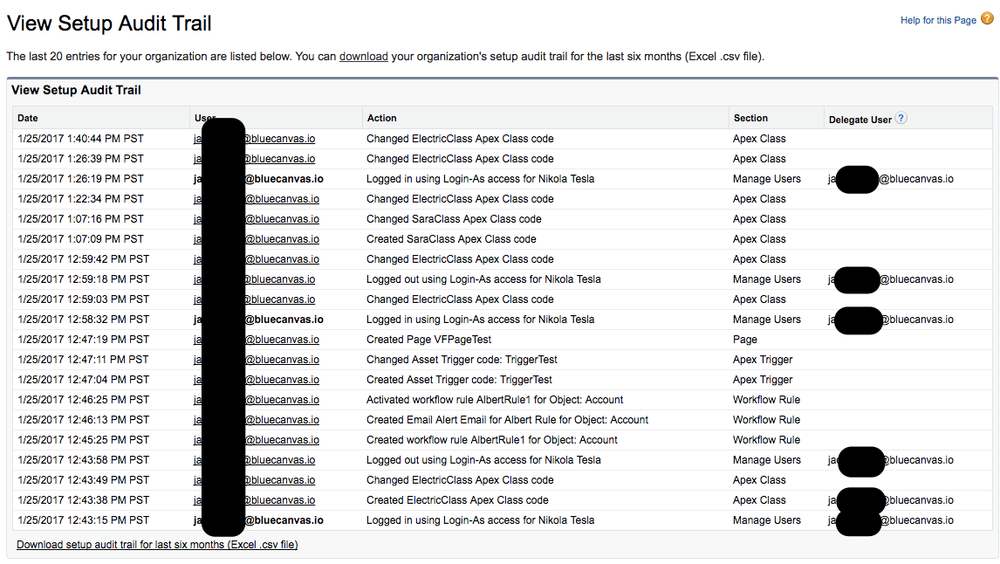
The audit trail is nice but it’s misses a lot. First, it only shows the last 20 changes in the UI. If you want more information you can download the last six months of changes as .csv file, but that’s it. If you need to go back further you cannot. And the data they do provide is pretty spartan. It shows the user and the file name they changed but nothing more. There is no way to show specifically what changed. How a user changed a file is usually a lot more critical than the name of the file they changed.
VERSION CONTROL SHOWS WHAT CHANGED IN SALESFORCE
Fortunately, you can use a tool like Git to provide more tracking. The Blue Canvas implementation of Git for Salesforce provides a lot more data to Salesforce admins and developers looking to see what is happening on their Orgs.
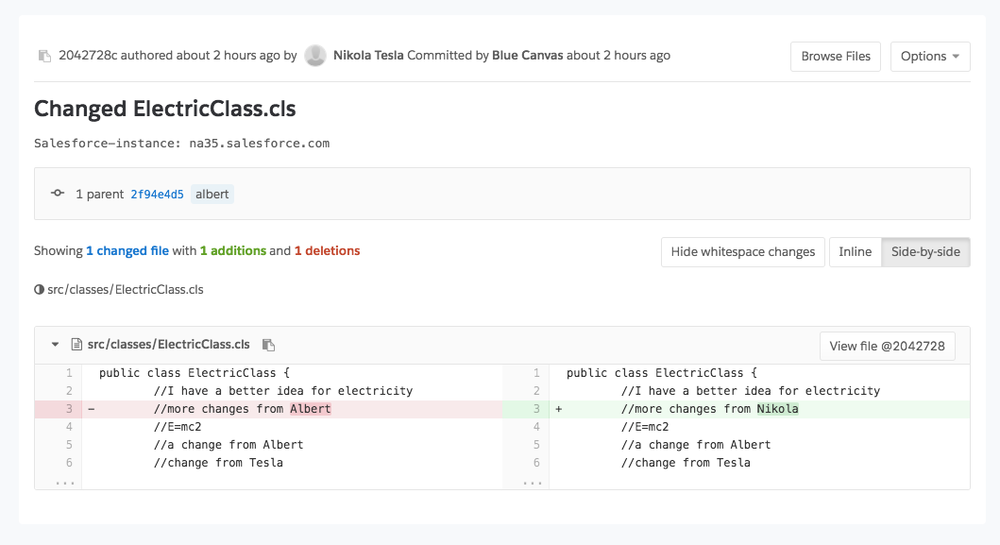
With Blue Canvas, Git keeps track of the username of the user who made each change and takes a timestamp of when it happened. Most importantly, we also log the specific code changes that happen in Git so you can see what has been changed. Blue Canvas also tracks declarative changes as well.
Instead of a list of filenames for the last 20 changes made, you can see the actual lines of code or XML that were altered. If someone makes changes to an Apex Class you can see that as shown below:
NO WORKFLOW CHANGE REQUIRED
Blue Canvas is continuously polling for changes and automatically adds them to your Git history so there is no required change to your workflow. Admins don’t need to learn Git flow in order to get the benefit of version control.
CHANGES IN REAL TIME
Blue Canvas tracks changes in real time so you know that the changes are up to date. No worrying about missing a back up or having gaps in your knowledge. You can always pull up the latest history of changes in the Blue Canvas Git UI.
AUTOMATIC SNAPSHOTS WITH NO SETUP
Configuring Blue Canvas to capture this kind of data is very simple. Just use the Salesforce OAuth flow to connect your Orgs. It takes literally four clicks to get automatic rich tracking.
GO ALL THE WAY BACK
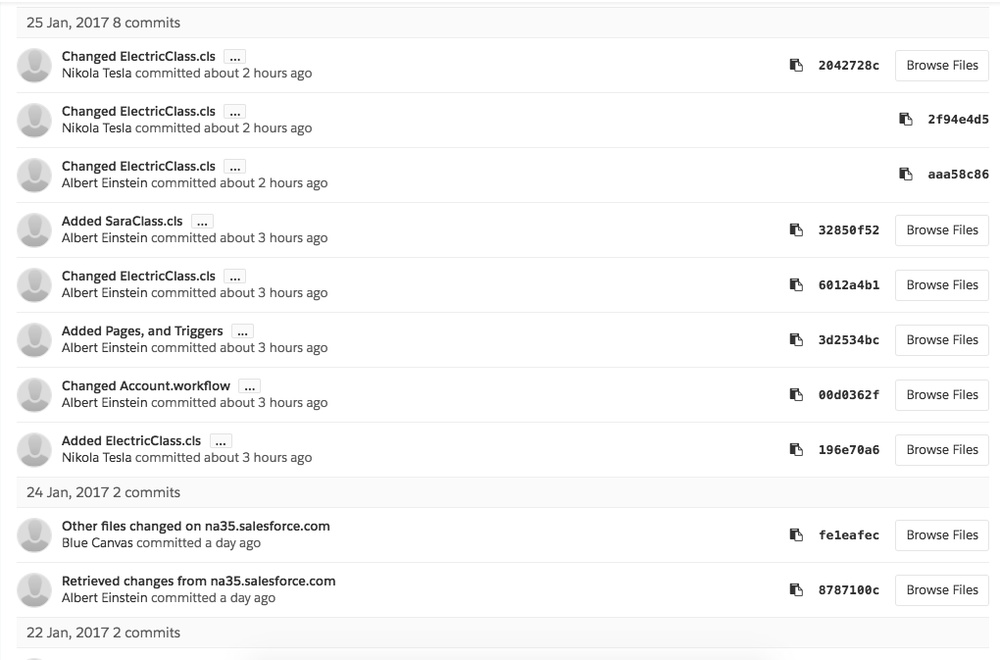
Blue Canvas doesn’t just give you the last six months. It gives you a full history of all changes dating back to when you first connected your Org. If you need to go back more than six months you can do so. This happens more than you think. Legacy Salesforce implementations can be quite old and we’ve talked to more than a few consultants who were hired to clean up legacy code. Having this kind of tracking would save them a lot of time. We also talk to a lot of Salesforce enterprise users who need a whole year of data for compliance reasons.
ACTIONABLE SNAPSHOTS
Best of all, each change is captured as a Git commit. Which means that you can actually use the snapshot for more than auditing. You can actually roll back or revert to previous states of your application using these snapshots.