5 Steps to Implementing a Low-Friction DevOps Strategy
This guide will help you focus on your people and processes before retooling. Together, we’ll walk through how to make realistic and manageable changes to your DevOps process starting today.
 By Randalyn Hill-Coffer·Reviewed by the Blue Canvas team··Updated February 4, 2026·5 min read
Teams looking to increase collaboration and speed to deployment are loving the idea of Low-Ops. It’s a happy marriage between the safety of Git and the speed of clicks. However, moving from manual changes to a unified pipeline can be daunting. Changing process can be tricky for team members and result in more errors in the short time.
That’s why we put together this guide. There’s no need to overhaul the process in a day. Every successful and lasting change happens incrementally with high adoption. This guide will help you focus on your people and processes before retooling. Together, we’ll walk through how to make realistic and manageable changes to your DevOps process starting today.
Step 1: Audit Your Current Friction Points
It’s hard to know what we want to change, without fully understanding where the problem is occurring from. The best way to begin a shift to a new process is to audit the old one. Start by looking at your last three releases. Where did the delays happen?
For most teams, the delays come from one of three key areas. Let’s break those down:
- First, look at metadata tracking. Are people still using spreadsheets to track changes? This is a major source of error.
- Second, look at environment drift. Do your sandboxes look like your production org? If not, deployments will always be painful.
- Third, look at the handoff. How do Admins give their work to Developers? If it requires a manual document, you have a friction point.
If you have friction in one (or more) of these areas, no need to worry! You cannot improve what is unmeasured.

Step 2: Establish a Single Source of Truth
For most companies this “source of truth” is their Production Org. That works for small teams or teams who don’t deploy changes frequently. It’s not sustainable to have your LIVE working code being used for experiments and testing. In a Low-Ops world, it’s ideal that the “source of truth” becomes something everyone can see and interact with without having to make live changes. We recommend Git.
Your admin will not like this change. They are used to seeing their work live in the org. Switching to a new system will be scary for them. But, it’s important to affirm that neither them, nor Git are the bad guy.
Instead of constantly being frustrated with data gone wrong, you’ll now have a steady stream of accurate data to reference. Git takes on the role of a time machine. Without any extra effort or time for your admins, it’s going to log every change. This way, you never need to wonder what changed and when, you can just reference changes as needed.
On the technical side: every team member will need access to Git. However, they do not all need to use the command line. We recommend using a tool that will connect your sandboxes directly to Git Branches.
This way, your Admins can save a small change, and there’s no issues. Git will automatically update. This keeps the source of truth accurate without extra effort.
Step 3: Align Your Environment Strategy
Low-Ops requires a clear sandbox strategy. We recommend using one branch per sandbox to maintain clear lines.
How does this work in practice? Each team member gets their own sandbox. This sandbox is linked to its own Git branch. Individual branches and sandboxes help prevent people from overwriting and stepping on each other’s toes.
When an update is made, the user moves it to a shared integration sandbox. With a Low-Ops workflow, this is a simple click to push work into a new spot.
Git will handle the merge behind the scenes. If there’s a conflict, it is clearly highlighted. A platform like Blue Canvas allows you to compare code side by side to visually see what changed and where the conflict is to help you find a solution.

Step 4: Automate the "Boring Stuff"
DevOps isn’t all new code and fun deployments, there’s often a lot of repetitive tasks. It’s the “operations” piece of the development. These often boring and frequently recurring tasks include:
- Validating packages
- Running unit tests
- Checking for profile and permission conflicts
- And more
In order to turn your “DevOps” into “Low-Ops” these tasks should be automated. The best case scenario would be:
- User submits a piece of work
- It’s checked automatically and immediately
These checks should answer two key questions:
- Does this change break a dependency?
- Does it pass the required test coverage?
If the answer to either question is no, the system should tell the user right away. Automated tests that give quick and clear feedback help to catch errors early. Embracing tests like this helps prevent a small mistake from becoming a production outage.
Step 5: Foster a Culture of Peer Review
In order to successfully create a low-ops culture, your team will need to embrace peer review. Using Git’s Pull Request (PR). By leveraging PR’s into your workflow, as your teammates are merging work, it will allow you to quickly and effectively comb through review and put human eyes on the logic.
In traditional “DevOps” Admins are left out of this process. In a Low-Ops workflow, they participate along with the developers.
The pros here are that a senior developer can review an Admin’s Flow logic. While an Admin can check a Developer’s Apex code for business alignment. This allows that both sides are doing fruitful work, relevant to their expertise and knowledge, while involving the whole team for morale’s sake.
The best way to use PRs is to keep reviews focused on quality and learning. With the help of a visual diff tool, you can show exactly what changed in the UI. This makes the review process inclusive for everyone.

Step 6: Measure and Iterate
When you’re making process updates it’s important to remember that Low-Ops is not a final destination. We’re moving towards a better way of working, and as with any improvement, there will always be more to do.
A couple great places to start are:
- Track your "Deployment Frequency." How often are you shipping to production?
- Track your "Change Failure Rate." How many deployments cause an issue?
The good news is: as your team gets more comfortable with this process, you will see these numbers improve! Increased speed is a natural by-product deep trust in the system. Building this initially will take time, but it optimizes for outcome as the system grows.
Summary of the Low-Ops Implementation
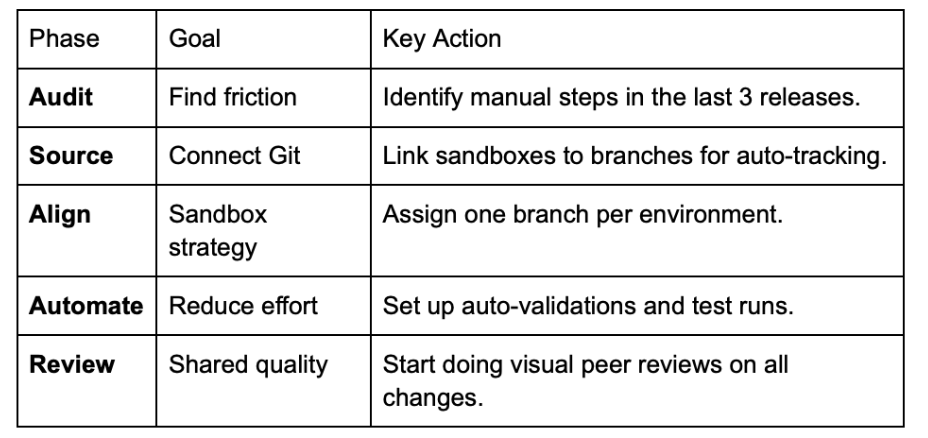
Conclusion: The Goal is Flow
While low ops can sound like you’re setting your team up for failure, it’s referring to the ongoing effort required to create value for your team. The goal is to make it seamless for admins and developers to process tickets and ship code.
The key to this process is making your tools work for your people. This way your people can work for your customers. The best news? You don’t need to work on a massive enterprise sized team to want to optimize and secure your deployment process. We actually recommend you do it before you get to that point. 😉
You just need a clear path and the right philosophy. Start small. Solve one friction point at a time. Soon, your team will be moving faster than you ever thought possible.