Get Ready for Multi Factor Authentication (MFA)
Everything you need to know to get ready for Salesforce’s new MFA enablement.
 By Randalyn Hill-Coffer·Reviewed by the Blue Canvas team··6 min read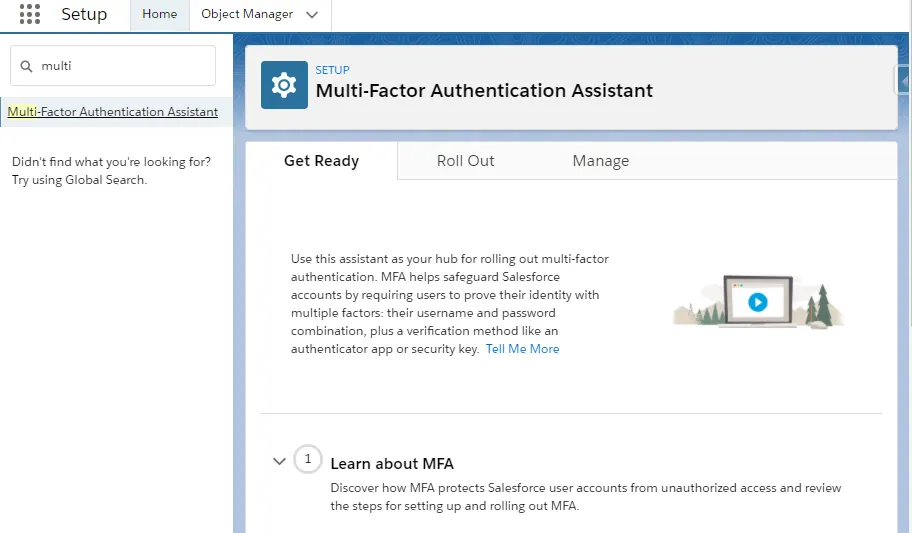
According to Salesforce, MFA is going to take effect on February 1, 2022. It will be required for all single-sign-on SSO logins and logins through user interface and you can turn it on directly in your Salesforce products or use your SSO provider’s MFA service.
You can find a list of products supported here.
Salesforce has a nice MFA assistant available in the setup and step by step instructions on your mobile device when you activate MFA.
1. Create Permission Set
Create a permission set for MFA (with a nice API name if possible if you like your developers) and search in the permission set settings in search box field multi-factor and choose Authentication for User Interface Logins permission from the lookup preview window of the search box.
There are multiple MFA related permissions but the one we are looking for is the User Interface Logins one.

2. Assign Users
Like a regular permission set assignment, assign it to the users who will require MFA to login through UI.
After you enable MFA, users will get a screen prompt when they try to login after the first time. You can select a verification method and with Salesforce Authenticator you can set up trusted locations to automatically approve your login requests (if you have location services enabled).
For Salesforce Authenticator, you can enter the two-word phrase that the app generates to add it as a verification method. To add an account, open the Salesforce Authenticator app in your mobile device, Add an Account to generate the two-word phrase keywords.
When a user logs in, they get a push notification on their mobile device. The user taps the notification to open Salesforce Authenticator and sees the following information:
• The action that needs to be approved
• Which user is requesting the action
• Which service is requesting the action
• What device the user is using
• The location from which the request is coming
You cannot use SMS (Text), phone call and email as alternative verification methods for MFA. As alternatives, you can also use Third-Party authenticator apps and devices (Google Authenticator etc.) and security keys (Google’s Titan Security Key etc.)
MFA Requirements for User Types
| User Type | MFA Required to Log In? | Notes |
|---|---|---|
| Internal users | Yes | Includes admins, developers, privileged users, standard users, and anyone authorized to act on behalf of a customer, such as partners and third-party agencies. |
| External users | No | Customers' customers and partners who log in to Experience Cloud sites, e-commerce sites, help portals, and so forth aren't required to use MFA. Note that some local jurisdictions or industries have stricter regulatory requirements regarding MFA that can result in these types of users requiring MFA. |
| Chatter External and Chatter Free users | No |
MFA Requirements for Login Types and Authentication Methods
| Login Type / Authentication Method | MFA Required to Log In? | Notes |
|---|---|---|
| Direct Logins to the UI | Yes | Applies to all Salesforce interfaces, including mobile apps and client apps like Data Loader. Note: The Password Authentication login option for Data Loader is an API login, which doesn't require MFA. |
| Automated Testing Account Logins to the UI | No | See Is MFA required for automated testing accounts? for more information. |
| API / Integration Logins | No | To set up API connections and integrations, admins must log in with MFA. |
| Device Activation / Identity Verification | Yes | Device activation isn't the same as MFA and it doesn't satisfy the MFA requirement. Salesforce products that include device activation must require MFA for every login. See What is Device Activation and how is it related to MFA? for more information. |
| Federated SSO (SAML, OpenID Connect) | Yes | See Is MFA required for Salesforce products that are accessed via SSO? for more details. |
| Delegated Authentication | Yes | |
| IP Restrictions | Yes | See Does restricting logins to specific IP addresses meet the MFA requirement? for details. |
| Certificate-Based Authentication | Depends | See Does certificate-based authentication meet the MFA requirement? for details. |
MFA Requirements for Types of Orgs and Tenants
| Org / Tenant Type | MFA Required to Log In? | Notes |
|---|---|---|
| Production environments | Yes | |
| Experience Cloud sites, e-commerce sites, help portals | See Notes | Customers' customers and partners who log in to these environments aren't required to use MFA. Employees and other internal users who access these sites must use MFA. |
| Sandbox environments (Partial, Full, Developer, Pro) | Yes | See How does MFA work in sandbox environments? for more information. |
| Developer Edition and Partner Developer Edition environments | Yes | |
| Trailhead Playgrounds | No | |
| Trials | See Notes | Trials have a grace period before the MFA requirement applies. If a trial period is longer than 45 days, MFA must be enabled for all users in the environment by the 45th day. When a trial is converted to production, MFA is required for all users. |
List of Products Excluded from MFA
Salesforce doesn't require MFA for the following on-premises products:
- MuleSoft Anypoint Platform On-Premises Edition.
- On-Premises Tableau Server and Tableau Public. In addition, Tableau Desktop, Tableau Prep, Tableau Content Migration Tool (CMT), and Tableau Resource Monitoring Tool (RMT) are excluded, unless connected to Tableau Online.
Why is MFA important?
Cybersecurity is becoming very important everyday and there are many threats that can affect users. It’s important to protect your business and customers according to the industry standards. MFA creates an extra layer of protection against threats like phishing attacks, credential stuffing and account takeovers. MFA is one of the easiest and effective ways to secure your accounts for free.
The reason why it’s called two factor is there is one layer which is the login credentials and the other factor is the verification methods that user has whether it’s by an app or a physical security key.
One tip for admins that might come in handy is that you can also create reports and dashboards to monitor MFA usage across your org.
Lightning Login
You can also use Lightning Login to satisfy the MFA requirement. This feature offers password-free access to Salesforce accounts. Lightning Login meets the MFA standard by requiring two authentication factors: Salesforce Authenticator (something a user has) and a PIN or biometric scan on their mobile device (something the user is).
Enable MFA with Session Security Levels
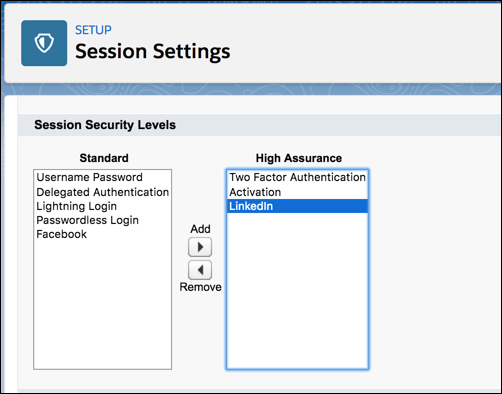
You can also enable MFA using security level, either standard or high assurance assigned to a login method in your Salesforce session settings.
Example Scenario:
You configured Facebook and LinkedIn as authentication providers in your site. Many of your site members use social sign-on to log in using the username and password from their Facebook or LinkedIn accounts. You want to increase security by requiring customers to use MFA when they log in with their Facebook account. You want users who log in with their LinkedIn account to be automatically granted high assurance access and bypass MFA.
In the Customer Community User profile, set the session security level required at login to High Assurance. In your session settings, edit the session security levels.
Because you’re requiring MFA with Facebook accounts, make sure that Facebook is in the Standard column. Add Multi-Factor Authentication to the High Assurance column. When users log in with their Facebook account, they’re required to provide a verification method in addition to their username and password. Add LinkedIn to the High Assurance column. When users log in with their LinkedIn account, they’re granted High Assurance access without needing to provide a verification method.
From what I have found, the scratch orgs are not supported, although enabling MFA on DevHubs could be necessary.
There might be additional configuration requirements if you are already using MFA from your SSO provider. There should be additional considerations for API users and some issues reported with using MFA with Salesforce plugin for outlook Be sure to check out the trailblazer community for more updates on this.