How to Streamline Salesforce Release Workflows and Minimize Conflicts in 2026 | Blue Canvas
Discover proven strategies and modern tooling to streamline Salesforce release workflows, reduce merge conflicts, and deliver more reliable deployments as org complexity grows.
 By Randalyn Hill-Coffer·Reviewed by the Blue Canvas team··Updated December 19, 2025·6 min read
Salesforce release management has changed dramatically over the last few years. What was once a relatively straightforward process, has become a complex coordination challenge across admins, developers, QA teams, and business stakeholders.
As Salesforce orgs grow larger, more integrated, and more regulated, release workflows are under increasing strain. Teams are deploying more frequently, working in parallel across shared metadata, and relying on a mix of code-based and declarative changes. Without the right processes in place, this complexity leads to conflicts, delays, and production risk.
In this guide, we’ll walk through modern best practices for streamlining Salesforce release workflows in 2026, based on how teams using platforms like Blue Canvas approach release visibility and risk management. We focus on reducing conflicts, improving visibility, and making releases safer and more predictable.
Why Salesforce release complexity continues to increase
Release challenges aren’t the result of poor execution, they’re a byproduct of how Salesforce is evolving.
Several trends are converging at once:
- More contributors per org
- Admins, developers, consultants, and business teams all make changes, often simultaneously.
- Expanding metadata surface area
- Flows, Dynamic Forms, permission sets, CPQ rules, bots, and integrations all introduce dependencies.
- Faster delivery expectations
- Agile and DevOps practices push teams toward more frequent deployments.
- Higher governance requirements
- Audit trails, rollback capability, and release documentation are no longer optional.
Each change, whether it’s a new Apex class or a small declarative update, can affect all the other in progress work. Without strong coordination, conflicts are inevitable.

Common friction points in Salesforce release workflows
Most release issues fall into a few predictable categories. Identifying them clearly makes it easier to address the root cause.
1. Merge conflicts discovered too late
When multiple teams modify the same metadata in isolated sandboxes, conflicts often surface right before deployment—when timelines are tight and fixes are expensive.
2. Manual, error-prone deployments
Change Sets and click-heavy deployment paths increase the likelihood of missing dependencies or overwriting changes unintentionally.
3. Siloed teams and environments
When there’s no shared source of truth, teams struggle to understand what’s changed, where it’s been tested, and what’s ready to release.
4. Declarative changes outside version control
Flows and configuration updates made directly in orgs can bypass release workflows entirely, creating blind spots.
5. Inconsistent testing practices
Uncoordinated test coverage and stale sandboxes lead to last-minute failures and emergency hotfixes.
Any of these issues left unaddressed lead to slow delivery and erode trust in the release process. Fortunately, you don’t have to be stuck in this cycle of crossing your fingers and hoping it works!
Best practices for modern Salesforce release management
High-performing Salesforce teams take a process-first approach to release management. Tools support the workflow. However, without better habits and structure your team will still struggle. This isn’t something a new tool can bandaid. You have to also address the processes you work with.
1. Adopt source-driven development for all metadata
Modern release workflows treat source control as the system of record, not individual sandboxes.
Best practices include:
- Automatically capturing all metadata changes (code and declarative)
- Committing admin-driven changes alongside developer work
- Maintaining a clear, auditable history of what changed and why
This approach eliminates “lost” changes and ensures everyone is working from the same baseline.
2. Use branching strategies that reflect how teams work
As teams scale, a single shared branch quickly becomes a bottleneck.
More effective models include:
- Feature branches for parallel initiatives
- Environment-aligned branches for QA, UAT, and production
- Short-lived branches to reduce long-running divergence
By aligning branches with real workflows, conflicts surface earlier and are easier to resolve.
3. Detect conflicts early with shift-left practices
Waiting until deployment to find conflicts increases risk and stress.
Leading teams “shift left” by:
- Running automated validation and conflict checks on pull requests
- Comparing metadata changes visually, not just through raw XML
- Simulating deployments before changes reach shared environments
Earlier detection means fewer surprises and faster resolution.

4. Standardize testing and sandbox management
Reliable releases depend on consistent testing and healthy environments.
Key practices include:
- Enforcing automated tests for all deployments
- Aligning test data and configuration across sandboxes
- Refreshing and seeding sandboxes on a predictable schedule
This reduces drift between your environments and increases confidence as changes move closer to production.
5. Build a continuous integration pipeline
CI/CD is no longer optional for Salesforce teams.
A modern pipeline should:
- Trigger builds and tests on every commit
- Promote changes incrementally through environments
- Support safe rollback when issues occur
Today’s DevOps platforms make CI/CD accessible to both admin-heavy and code-heavy teams, without requiring deep CLI expertise.
Choosing the right release management tools
As release complexity increases, manual tools struggle to keep up.
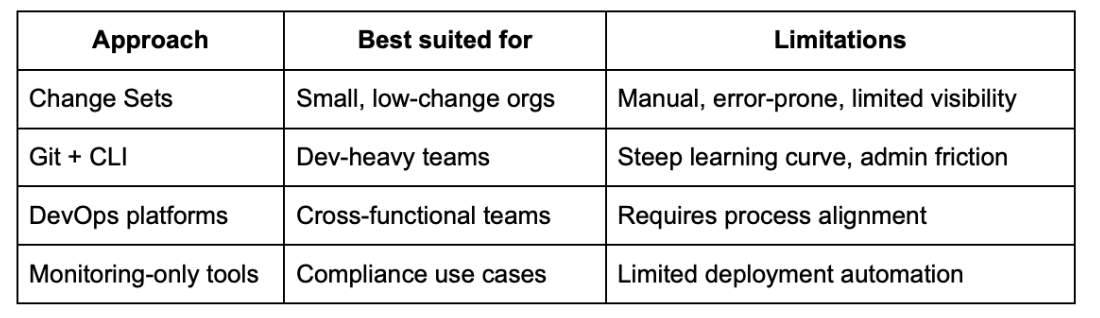
Platforms like Blue Canvas are designed to bridge the gap between admins and developers by automatically tracking metadata changes, surfacing conflicts early, and providing clear, auditable release workflows.
Process and culture: the missing layer
Even the best tooling can’t compensate for unclear processes.
Teams that reduce conflicts consistently also invest in:
- Frequent, small commits and merges
- Shared code and configuration reviews
- Clear release calendars and communication
- Transparent change logs and notifications
- Ongoing enablement for non-developers
Release management works best when everyone understands how their changes affect others.
Measuring release workflow success
Tracking the right metrics helps reinforce improvement over time. It’s easy to know you need KPIs to ensure you’re growing, but which ones actually mean your release system is evolving?
We suggest tracking:
- Time from “code complete” to production
- Frequency and severity of merge conflicts
- Post-release defects and hotfixes
- QA and UAT cycle length
- Rollback and recovery events
These KPIs provide objective feedback on whether process changes are working.
What’s next for Salesforce release management
As Salesforce continues to evolve, release management will only become more critical. AI-assisted conflict detection, deeper collaboration integrations, and increased automation are already shaping the next generation of DevOps practices.
Teams that invest now in structured workflows, early conflict detection, and shared visibility will be best positioned to scale safely, without turning every release into a fire drill.

Frequently Asked Questions
Why do Salesforce merge conflicts happen so often?
Merge conflicts usually happen when multiple people update the same metadata across disconnected sandboxes. Declarative changes, like Flows, page layouts, and permission sets, are especially vulnerable because they’re often made directly in orgs and aren’t consistently tracked.
Blue Canvas reduces this risk by automatically capturing all metadata changes. Both code and declarative! We capture both in a shared, Git-backed system of record. By surfacing overlaps early with readable diffs, teams can resolve conflicts long before deployment windows are at risk.
Are Salesforce Change Sets still viable for release management in 2026?
Change Sets can still work for very small teams with low deployment volume, but they struggle to support modern Salesforce environments. They lack version history, conflict visibility, automation, and reliable rollback.
Blue Canvas replaces manual Change Set workflows with source-driven releases, automated validation, and deploy-aware rollback. This allows teams to move faster while maintaining a clear audit trail, without relying on error-prone click paths.
How can admins participate in release management without learning Git?
Admins play a critical role in modern Salesforce delivery, but traditional Git workflows can be a barrier. Without support, admin changes often bypass release processes entirely.
Blue Canvas is designed to bridge the admin-developer gap. It automatically tracks declarative changes, presents visual diffs, and supports approval workflows through an intuitive interface, so admins can safely participate in release management without using the command line.

What’s the best way to reduce Salesforce release risk without slowing teams down?
Reducing risk doesn’t require slower releases, it requires earlier insight. The most effective teams catch conflicts and errors during development, not at deployment.
Blue Canvas supports this by enabling early conflict detection, continuous validation, and environment-aware promotion. Because changes are tracked continuously and tested incrementally, teams spend less time firefighting and more time delivering with confidence.
How does Blue Canvas support compliance and audit requirements?
Many Salesforce teams operate under strict regulatory or internal governance requirements, where visibility and traceability are non-negotiable.
Blue Canvas provides commit-level change history, readable metadata diffs, and exportable audit trails that clearly show what changed, who changed it, and when. This makes it easier to satisfy internal reviews, external audits, and rollback requirements without maintaining separate tracking systems.