We are launching Quick Sync, for faster Salesforce DevOps
From your sandbox to a git repository in less than a minute
 By Blue Canvas Team·Reviewed by the Blue Canvas team··4 min read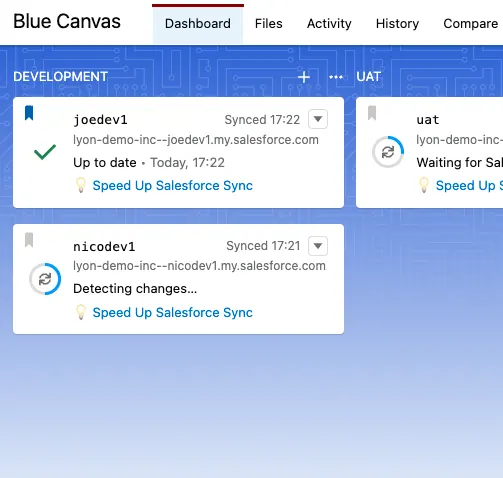
As a summer surprise for all of our users, we are currently deploying—as a free upgrade—our latest ‘Quick Sync’ feature to all Blue Canvas accounts. With Quick Sync, we are greatly improving one of the fundamentals of Salesforce DevOps: version control that’s fast, reliable, and turbocharges your workflow. Quick Sync mirrors metadata changes from your sandbox to a Git repository within a minute. Velocity is the cornerstone of any efficient DevOps workflow, and we’re excited to walk you through the immediate benefits of this new feature. This blog post will also cover the one requirement for this feature, and how to get started.
Before Quick Sync, the untold truth about Salesforce Version Control
At Blue Canvas we’ve always been very upfront and honest about the fact that doing Git+Salesforce right is actually hard. It’s one thing to set up a Git repo and have it mirror Salesforce metadata/config at a given moment, but keeping that repository continuously in sync with the org is a much more complex problem. Some tools try to workaround that by having the user explicitly ‘refresh’ the repo, but we consider such manual approaches (and its extra overhead) to be deal breakers from the get-go.
In our effort to build the fully automated solution that the Salesforce community expects, we ourselves have hit Salesforce limitations: there was no Salesforce API advertising changed metadata, and DevOps tools therefore had to download the whole metadata set each time. This meant waiting anywhere between 10 to 30 minutes depending on the org size, and the feedback of users was clear: this gets noticed, limits the extent to which DevOps best-practices can be applied, and ultimately is frustrating too.
So when we learned Salesforce introduced an improved API around metadata tracking, we immediately set out to engineer a new version control solution, and build what we are now calling Quick Sync.
How Salesforce Source Tracking can speed up Version Control
It takes two to tango 💃🏻🕺🏼 The credits for this new feature don’t just go to our engineering team, but also to team behind the Salesforce API! The addition of Source Tracking capabilities have enabled tools like ours to get a more granular view of changes applied in Salesforce sandboxes. Leveraging that API meant we could break free from downloading all of the Salesforce metadata each time, and ultimately reduce the sync time!
The end result is precisely that: Blue Canvas continuously interacts with the Source Tracking API of your sandbox, to know when new metadata changes are introduced. The minute some change does occur, Blue Canvas pulls down just that specific change and commits it into the Git repository. No end-user intervention, no more bulky download, just Quick Sync doing its optimized work under the hood.
Technicalities aside, what we think matters most is the end-user experience this enables. No more context-switching due to waiting times, and no need to manually intervene. Instead you, as a developer or admin, can stay focused on your deployment workflow and goals. More impact, more velocity, more delight too.
Getting started with Quick Sync 🚀
Where do I start, might you ask? As we mentioned, Quick Sync is already getting rolled out to all Blue Canvas deployments. That said, the feature does rely on this Source Tracking API we just mentioned, which is an optionally enabled API . If Blue Canvas detects that Source Tracking can be enabled in your environment, it will automatically inform you on your main dashboard:
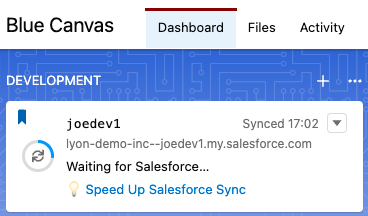
That link will guide you through enabling the feature. You can also directly consult the Salesforce documentation itself: Enable Source Tracking in Sandboxes . Specifically you may notice:
| This feature is available in Developer and Developer Pro Sandboxes only
This means that, by design, Salesforce limits Source Tracking to sandboxes only. It is therefore not available for Production orgs. This is a limitation that Blue Canvas inherits (i.e. no Quick Sync for production orgs). But if you take a step back, it’s an acceptable tradeoff: the primary goal is to speed-up the development workflow towards the production org, and give developers and admins the tools they need to perform in their sandbox environment.
Connect your Orgs and benefit from Salesforce Version Control today!
To all our existing users: we hope you’ll love this new feature. Velocity is at the essence of DevOps, and fast source control is at the essence of velocity. As we are deploying Quick Sync to all Blue Canvas environments, simply watch out for the Salesforce Source Tracking requirement we covered in this post.
For readers that perhaps haven’t yet tried git-powered DevOps with Blue Canvas: we invite you to sign up for free at https://accounts.bluecanvas.io/signup . Just connect your orgs, compare them in seconds, and speed up your deployment workflow thanks to Quick Sync!
We hope you’ll love the experience, would be thrilled to get your feedback and look forward to delight you with more new features.
Best,
The Blue Canvas Team