Salesforce Metadata Backups
Backing up Salesforce metadata is just as important as backing up data. Blue Canvas uses Git to automatically backup metadata changes.
 By Blue Canvas Team·Reviewed by the Blue Canvas team··Updated September 22, 2023·3 min read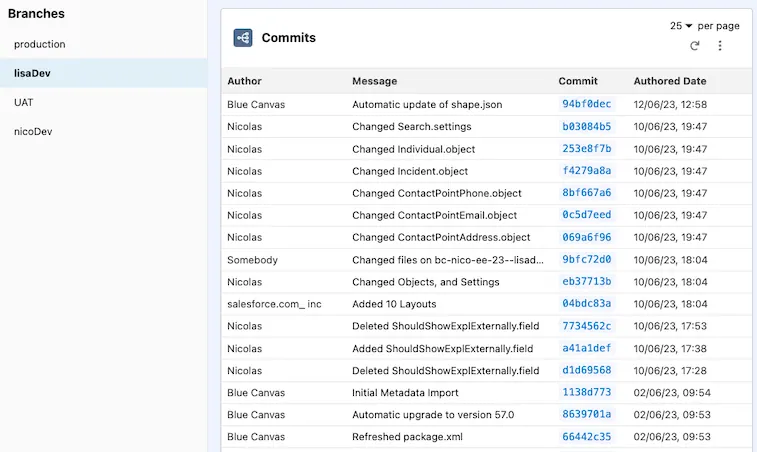
With this article, learn about the importance of backing up Salesforce metadata and how source control can help with this. Discover also the benefits of frequent snapshots, to increase security and gain the ability to roll back to previous versions.
Here are our 5 Key Takeaways:
1. Salesforce's Trust is built on the privacy of customer data.
2. Backing up metadata is just as important as backing up data.
3. Source control provides frequent snapshots of metadata and allows for easy rollback.
4. Frequent snapshots increase security and can improve application quality.
5. Dedicated tools that can make metadata backups through source control simple and automatic.
One of the great things about is Salesforce is Trust. Co-founder Parker Harris makes it clear: “Nothing is more important to our company than the privacy of our customers’ data”. A big part of Salesforce’s continued growth and success in the market is the level of trust they have been able earn from organizations around their data. Still, you can never be too sure.
Naturally organizations go to great lengths to protect their data. Data backups are a common thing in the Salesforce world. Google “salesforce data backup” and you’ll be shown to tools like Datto Backupify, Spanning by Dell and CloudAlly.
But what about Salesforce metadata? Is it backed up? Can you rollback to previous states if bugs or issues become apparent?
Why backing up Salesforce Metadata matters?
Your metadata is constantly evolving so it’s just as important (if not more so) to back it up regularly. Most teams have a number of developers, admins, product managers, business analysts and other stakeholders who can make changes to metadata. This is a good thing. It’s what makes Salesforce the dynamic platform that is is. But given the often frenzied activity and the diverse group that can cause the activity it’s good to have a backup of your metadata.
Backups enable history tracking
Source control provides frequent snapshots of your code base and metadata as it moves through time. This allows you to see what has changed in your metadata each day. You have timestamped logs and a clear picture of specifically what files and what information changed. Frequent snapshots also make your app more secure: it’s good to know who is changing what on the system, what time they changed it and what they changed.
Backups enable rollbacks
It’s comforting to know that you can, at any time, roll back to a previous version of your metadata and therefore your Salesforce application. Release a bug at a crucial time? Just roll back to the state the Org was in before you did the release. Did one developer push changes that wiped out the changes of another? Rest easily in the knowledge that you will be able to trace back through your source code and avoid losing anything that was there before. With Git and Salesforce, metadata restores are very simple.
In addition to the comfort you get knowing that your metadata is backed up and adequately logged, snapshots for your Salesforce metadata can help increase the quality of your application. With frequent code commits, you can do software development best practices like code reviews.
Backing up Salesforce Metadata with Blue Canvas
Blue Canvas makes metadata backups through source control simple and automatic. Any change to metadata on your Salesforce Orgs will be automatically backed up on a regular time interval. Blue Canvas uses Git to do this. Git is an ideal tool because developers love working with it and it is a standard for source control throughout the software industry.
The best thing about using Git through Blue Canvas is that Git commits from non-developers happen automatically. Declarative changes are picked up as well as changes to code. If an admin or a non-developer makes a change through the Salesforce UI to your metadata, that will be picked up and committed to your Git history. Developers can continue to work with Git as they normally do, but work assured that they are not going to be blindsided by metadata changes in production that aren’t committed into source control.
Want to know more about backing up Salesforce Metadata with Blue Canvas, discover our dedicated feature page and start your free trial!