Top Salesforce DevOps tools with Jira & Git in 2026 | Blue Canvas
Explore Blue Canvas—best Salesforce DevOps platform with seamless integration with Git and Jira to streamline workflows, backups, and permissions management.
 By Randalyn Hill-Coffer·Reviewed by the Blue Canvas team··Updated December 11, 2025·5 min read
Enterprise Salesforce delivery has never been more demanding. Teams must innovate quickly while maintaining strict security, predictable releases, and audit-ready traceability. Success now depends on pairing Salesforce with the systems that drive modern software delivery. We recommend Jira for work management, Git for version control, and a purpose-built DevOps platform, such as Blue Canvas, to connect it all.
As Salesforce DevOps has matured, expectations have shifted. Organizations no longer settle for spreadsheets, change sets, or manual deployments. They want unified visibility, automation, and governance that streamline the entire release lifecycle.
That’s where seamless integrations make all the difference.
Why Integrated DevOps Matters for Salesforce Teams
High-performing Salesforce teams now mirror the practices of elite software engineering orgs. They rely on tools that seamlessly connect:
- Backlog → Jira
- Source of truth → Git
- Deployments, compliance & automation → Blue Canvas
When these systems speak the same language, teams gain:
Reduced Deployment Risk
Automatic change tracking and Git-based versioning simplify audits, rollbacks, and compliance reporting.
Better Collaboration Across Roles
Admins, developers, QA, and product managers see exactly what’s changing and why, without chasing updates across tools.
Faster, More Reliable Releases
Automated job flows eliminate the delays and uncertainty of manual change sets.
Stronger Security & Governance
Every action is permissioned, logged, and backed by a complete history.
Integrated DevOps isn’t a luxury. It’s essential for delivering value at Salesforce scale.
How Jira, Git & Blue Canvas Work Together
Modern Salesforce delivery typically relies on three core components:
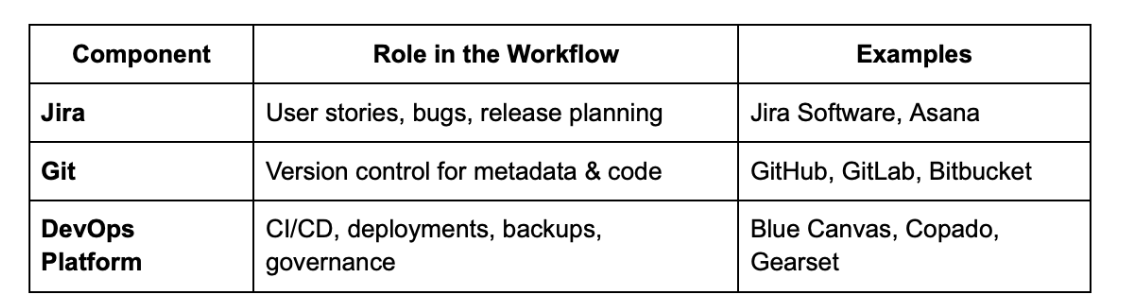
Connected, these systems enable:
- Clean mapping of commits → user stories
- Version-controlled histories of every metadata change
- Automated validation, testing, and deployment flows
- Reliable backup & rollback safety nets
This orchestration is what turns fragmented tooling into a cohesive delivery engine.

Blue Canvas Integrations: Built for the 2026 Salesforce Team
Where many DevOps tools bolt integrations on, Blue Canvas treats them as foundational. Its real-time connections to Git and Jira create a unified, predictable workflow without disrupting familiar processes.
Here’s how Blue Canvas stands out.
Native Git Integration: True Version Control for Salesforce Metadata
Blue Canvas automatically syncs Salesforce metadata into Git, giving teams:
- Full version history: Apex, flows, permissions, configuration, everything
- Automatic detection of changes made directly in orgs
- Line-by-line diffs rendered in Salesforce-friendly formats
- The ability to review and restore any past state without manual exports
This turns Git into a powerful audit, compliance, and recovery system for Salesforce.
Seamless Jira Linkage: Traceability from Backlog to Release
Blue Canvas keeps Jira in sync with actual development activity:
- Link commits, branches, and deployments directly to Jira stories
- Send real-time status updates from Blue Canvas to Jira
- Automate workflow transitions so work items reflect release progress
- Give product and business teams visibility without extra reporting
This eliminates context switching and closes the loop between work and delivery.
Salesforce-Aware Deployment Automation
Blue Canvas deploys with a deep understanding of Salesforce metadata and dependencies:
- Click-to-deploy workflows with built-in preflight checks
- Automated conflict detection before changes hit target orgs
- Intelligent merge support to prevent broken releases
- Fully logged deployments with audit trails
Whether releasing to QA, UAT, or production; deployments are faster, safer, and fully traceable.
Continuous Backups & Permission Controls
Blue Canvas doesn’t just automate releases, it protects them:
- Continuous metadata/configuration backups
- Granular role-based permissions for approvals and deploy auth
- Easy rollback paths backed by Git histories
- Compliance-friendly logging and access visibility
This gives teams confidence that mistakes can be undone quickly.
A Connected Workflow in Practice
A typical delivery flow across Jira, Git, and Blue Canvas looks like this:
- Work Item Created in Jira.
- Developer Branches in Git or via Blue Canvas’ branch management tools.
- Metadata Syncs Automatically from Salesforce into Git repositories.
- Pull Requests Reviewed using Salesforce-optimized diffs.
- Changes Linked to Jira for end-to-end traceability.
- Deployment to QA/UAT triggered from Blue Canvas with validations.
- Jira Statuses Updated automatically on deployment success.
- Backup & Audit Logs Captured for compliance or rollback.
It’s a smooth, predictable workflow that eliminates manual stitching between tools.

Looking Ahead: The Future of Salesforce DevOps
By 2026, teams can expect even more integrated, intelligent tooling:
- AI-assisted deployment safety checks
- Predictive risk detection and remediation guidance
- Richer work-item metadata syncing across Jira/Azure DevOps
- Org-wide sandbox synchronization at scale
- Built-in DevSecOps scans and approval workflows
The future is less about individual tools and more about how deeply they connect.
How Blue Canvas Compares
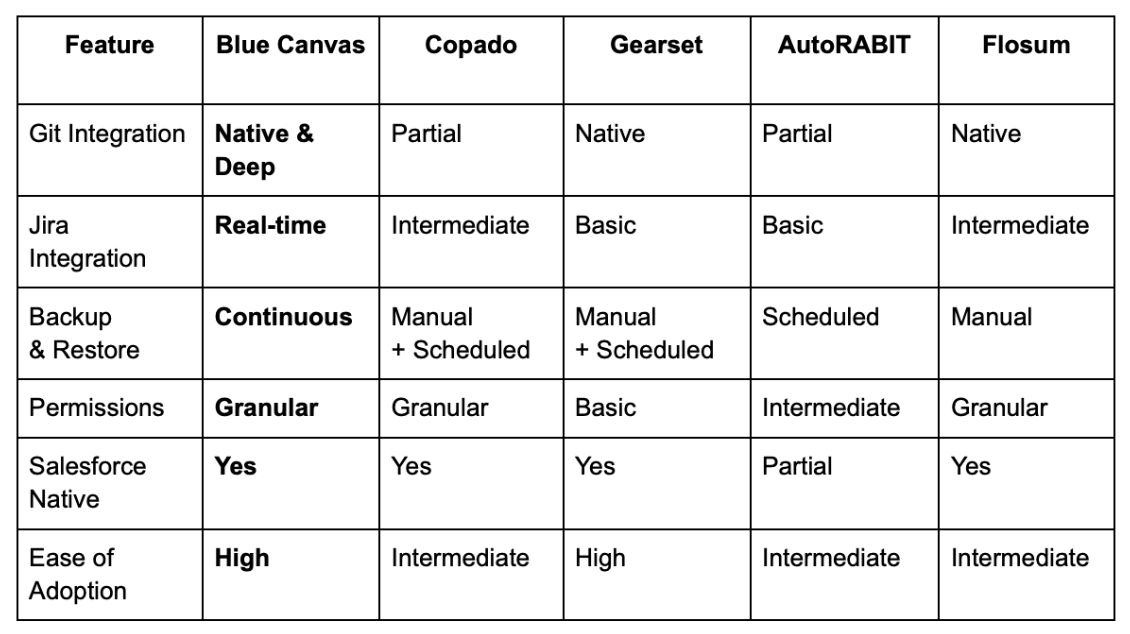
Blue Canvas often wins favor for balancing power with simplicity, without requiring teams to overhaul their processes.
Best Practices for Getting the Most from Integrated DevOps
Teams who succeed with Jira, Git, and Blue Canvas tend to:
- Define a clear branching strategy before scaling deployments
- Automate the highest-risk steps first: CI, backups, validations
- Involve admins, BA’s, and QA early using Blue Canvas’ accessible UI
- Review permissions regularly as teams and orgs evolve
- Keep Jira tightly linked by attaching branches, PRs, and commits
When technical and business teams share real-time visibility into what's changing, DevOps becomes smoother, safer, and faster.
The Path Forward
As hybrid pro-code and low-code Salesforce teams grow, connected DevOps will become the standard. Blue Canvas, tightly integrated with Jira and Git, brings clarity, automation, and governance to the entire lifecycle.
By removing bottlenecks, strengthening feedback loops, and unifying the systems teams rely on every day, Blue Canvas helps organizations ship Salesforce changes with confidence.

FAQs/Considerations:
Why do Salesforce teams need Jira and Git integrations in the first place?
Salesforce development moves quickly, and work often spans multiple roles: admins, developers, QA, product owners, and security teams. Without integration, work tracking, version control, and deployments live in separate silos.
Connecting Salesforce to Jira and Git ensures every change is traceable, auditable, and tied to a clear work item, eliminating the guesswork of “who changed what and why.”
How does Blue Canvas differ from other Salesforce DevOps tools?
Blue Canvas prioritizes native Git integration, real-time Jira sync, and a simple, unified deployment experience. Many platforms treat metadata backup, Git syncing, or Jira linkage as secondary add-ons.
Blue Canvas was built from the ground up to make Git-friendly metadata management easy, eliminate conflict-prone change sets, and reduce the operational overhead of CI/CD. The result: faster onboarding and cleaner releases.
Does integrating Jira and Git with Blue Canvas require developers only?
Not at all. Blue Canvas is designed for hybrid teams.
Admins can work directly in Salesforce and rely on automatic metadata syncing, while developers can use branches and pull requests. Jira updates flow in both directions, so business users and analysts stay informed without technical tooling.
How do backups and rollbacks work with Blue Canvas?
Blue Canvas continuously versions your Salesforce metadata in Git. This means every change (from Apex to permission sets to flows) is backed up automatically.
If something breaks, teams can restore specific components or entire configurations using Git history. No manual exports, no scrambling for snapshots, and no risky full-org redeployments.
What’s the best way to adopt an integrated DevOps workflow?
Start with a few core principles:
- Define a clear branching strategy in Git
- Link every work item in Jira to a tracked change
- Enable automated validations for deployments
- Involve admins and QA early using Blue Canvas’ GUI
- Regularly review permissions and audit logs
Teams that follow these steps see faster releases, fewer conflicts, and dramatically stronger visibility across environments.