Specify Apex Tests Before Deploying
You can now specify which Apex tests you want to run in Salesforce before you deploy with Blue Canvas.
 By Randalyn Hill-Coffer·Reviewed by the Blue Canvas team··3 min read
Exciting news: Blue Canvas now provides more control over which Apex unit tests you run when deploying to different environments!
With this new feature you can now choose between running all tests or specify which tests you want to run before a deployment. This makes adopting continuous integration for Salesforce even easier using Blue Canvas’ unique source control and CI automation platform.
By now we all know that automated testing is important. When you are confident in your Apex test suite, you can be confident in your deployment. You can go to sleep knowing you won’t get a dreaded 10pm call from the business saying something has gone wrong in the latest release.
However, for many of our customers, their Apex testing suite is a work in progress. Some tests give them accurate results while others fail semi-randomly. Furthermore, many teams have Apex test suites that take hours to run. When deploying from a dev org to a test sandbox or between sandboxes, it doesn’t necessarily make sense to run the entire test suite every time.
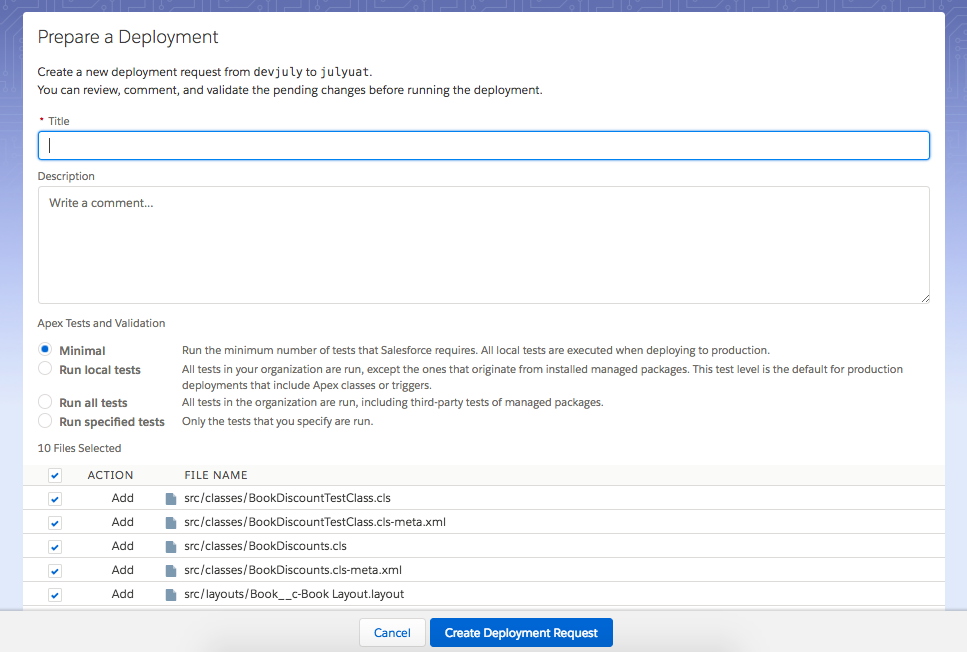
Blue Canvas helps address this by providing more flexibility in which tests you run when deploying between different sandboxes and for changes of various sizes. Are you doing a quick hotfix for some non-critical metadata? Maybe you just do a quick deploy with only a few tests. Are you doing a big deploy at the end of a spring but your test suite takes too long and is unreliable? You can specify just the tests that you deem essential.
Blue Canvas now provides four options when running a deployment request as it relates to Apex tests:
Minimal. Selecting “Minimal” runs the minimum number of tests that Salesforce requires for the target org (Salesforce requires 75% test coverage for production deploys for example). If you are deploying to production, Blue Canvas will trigger and run all tests when selecting this option. If you are deploying to a sandbox, no tests will run as Salesforce does not require any tests to run for sandbox deploys.
Run Local Tests. This option will run all tests in your organization except ones that originate from installed managed packages. This test level is the default for production deployments that include Apex classes or triggers. This is a great option to run tests that you’ve written and which are under your control but ignoring those that may come with managed packages or installed apps. It can be a big time and frustration saver.
Run All Tests. This option runs all tests in your Salesforce org, including third-party tests from managed packages.
Run Specified Tests. This option allows you to determine which tests you specifically want to run. This is great for deployments to staging sandboxes and provides you with the most control possible. Need to get something through to staging fast but with some degree of automated testing? You might want to try this one.
Every software development team must strike a balance between moving fast and maintaining quality. The actual balance for that will depend on your business and your industry. With the release of this new feature, you’ll be able to decide what balance to strike for your business. And you’ll be able to strike the right balance for each specific deployment.
Whether you want to run your entire test suite or just a single test, we leave it up to you because you know what’s best for each deployment.
July 16, 2018